
Mazda 6 Service Manual: Column cover removal/installation
1. Detach the fit of the upper column cover from the meter hood rubber.
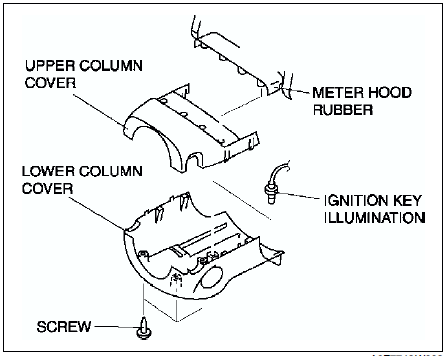
2. Remove the upper column cover.
3. Remove the ignition key illumination.
4. Remove the screws.
5. Remove the lower column cover.
6. Install in the reverse order of removal.
 Side panel removal/installation
1. Disengage clips using a tape-wrapped flathead screwdriver.
2. Pull the side panel toward you, then disengage tabs from dashboard, and
remove the side panel.
3. Install in the reverse order of ...
 Meter hood removal/installation
1. Remove the screws.
2. Pull the meter hood toward you, then detach the column cover.
3. Install in the reverse order of removal. ...
Other materials:
Mazda 6 Service Manual: Operating the Satellite Radio (Some models)
What is satellite radio?
With over 130 channels, SiriusXM Satellite Radio brings you more of what you
love. Get channels and channels of commercial-free music, plus sports, news, talk,
entertainment and more.
Commercial-free music from nearly every genre
—rock to pop, hip-hop to country, ja ...
Mazda 6 Service Manual: Battery Maintenance
To get the best service from a battery:
Keep it securely mounted.
Keep the top clean and dry.
Keep terminals and connections clean, tight, and coated with petroleum jelly
or terminal grease.
Rinse off spilled electrolyte immediately with a solution of water and baking
soda.
If th ...