
Mazda 6 Service Manual: Dtc 00:er10

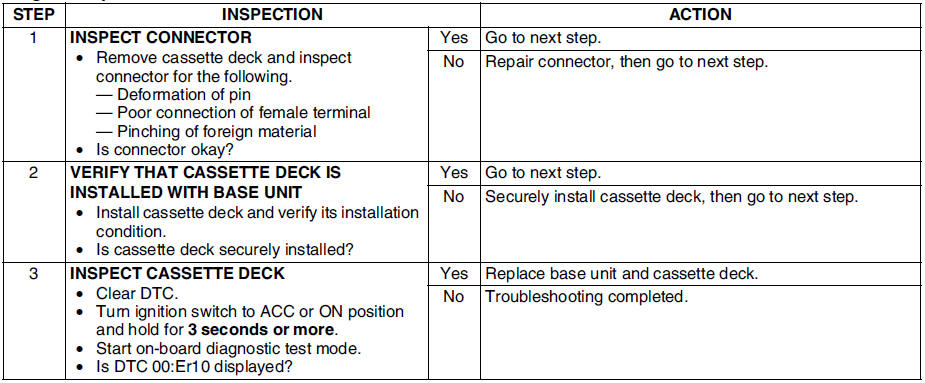
Diagnostic procedure
 Dtc 09:er20
Diagnostic procedure
...
 Dtc 03:er10
Diagnostic procedure
...
Other materials:
Mazda 6 Service Manual: Range of topics
This manual contains procedures for performing all required service
operations. The procedures are divided into the following five basic
operations:
Removal/Installation
Disassembly/Assembly
Replacement
Inspection
Adjustment
Simple operations which can be perf ...
Mazda 6 Service Manual: Abs (abs/tcs) hu/cm inspection
1. Disconnect the negative battery cable.
2. Connect the SST between the ABS (ABS/TCS) HU/CM and harness
connector with the ignition switch off.
3. Attach the tester leads to the SST and inspect voltage referring
the table below.
Terminal Voltage Table (Reference)
(Engine is idling, and co ...
© 2016-2026 Copyright www.mazda6info.net