
Mazda 6 Service Manual: Dtc c1510, c1511, c1512, c1513
Mazda 6 Service Manual / Braking system / On-board diagnostic (abs/tcs) / Dtc c1510, c1511, c1512, c1513
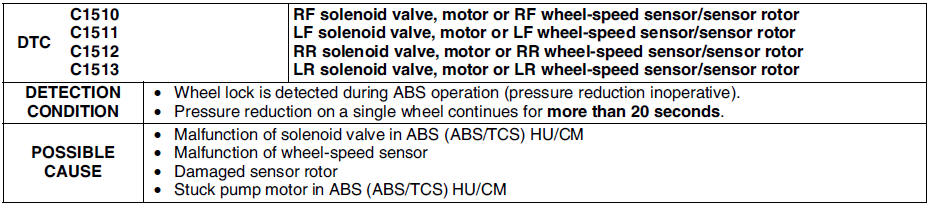
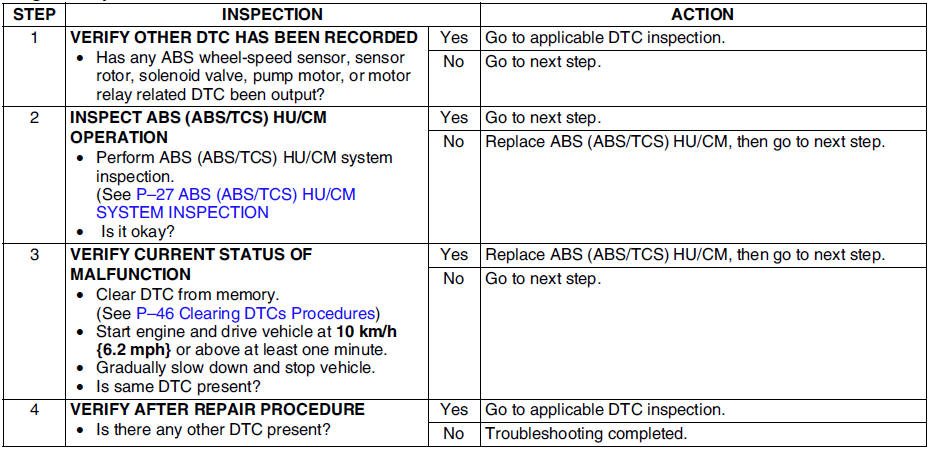
Diagnostic procedure
 Dtc c1508
Diagnostic procedure
...
 Dtc u2021
Note
To warm up the engine completely, idle the engine and wait for
more than 5 minutes.
Diagnostic procedure
...
Other materials:
Mazda 6 Service Manual: After repair procedure
Caution
After repairing a malfunction, perform this procedure to verify that the
malfunction has been corrected.
When this procedure is carried out, be sure to drive the vehicle at lawful
speed and pay attention to the other vehicles.
1. Connect the WDS or equivalent to the DLC-2.
2. Turn th ...
Mazda 6 Service Manual: Input/turbine speed sensor inspection
Caution
Water or foreign objects entering the connector can cause a poor
connection or corrosion. Be sure not to drop water or foreign objects on the
connector when disconnecting it.
1. Disconnect the negative battery cable.
2. Remove the battery and battery tray.
3. Remove the air cl ...
© 2016-2026 Copyright www.mazda6info.net