
Mazda 6 Service Manual: Rear brake (disc) removal/installation
1. Remove in the order indicated in the table.
2. Install in the reverse order of removal.
3. After installation, depress the pedal several times, rotate the wheel by hand, and verify that the brake does not drag.
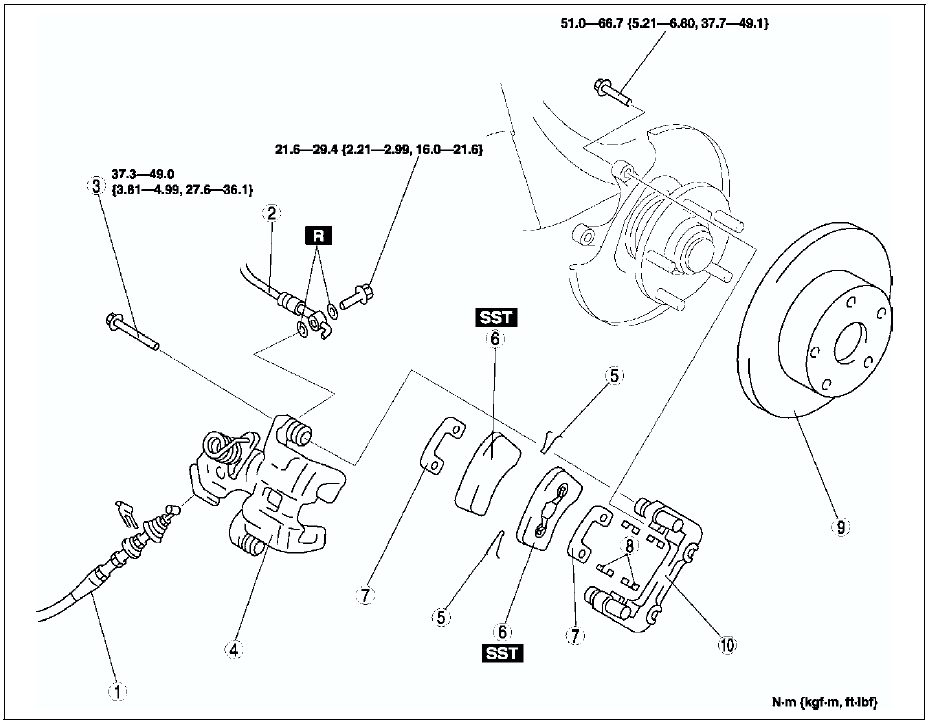

Disc Pad Installation Note
1. Turn the manual adjustment gear counterclockwise with an Allen wrench to pull the brake caliper piston inward. (Turn until it stops.)
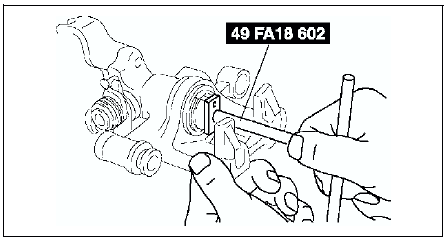
2. Install the disc pads.
3. Turn the manual adjustment gear clockwise until the brake pads just touch the disc plate. Turn the manual adjustment gear back 1/3-turn.
 Rear brake (disc) inspection
Brake Judder Repair Hint
1. (See FRONT BRAKE (DISC) INSPECTION.)
Disc Plate Thickness Inspection
Caution
Excessive runout may result if the disc plate is removed from the
vehicle then machin ...
 Disc pad (rear) replacement
1. Remove in the order indicated in the table.
2. Install in the reverse order of removal.
...
Other materials:
Mazda 6 Service Manual: Manual Shift Mode
The manual shift mode gives you the feel of driving a manual transaxle vehicle
by allowing you to operate the selector lever manually. This allows you to control
engine rpm and torque to the drive wheels much like a manual transaxle when more
control is desired.
To change to manual shift mode ...
Mazda 6 Service Manual: Automatic transaxle fluid (atf) inspection
Automatic Transaxle Fluid (ATF) Condition Inspection
One way of determining whether the transaxle should be disassembled is by
noting:
If the ATF is muddy or varnished.
If the ATF smells strange or unusual.
ATF Condition
Automatic Transaxle Fluid (ATF) Level Inspection
Caution
Th ...