
Mazda 6 Owners Manual: Component Parts
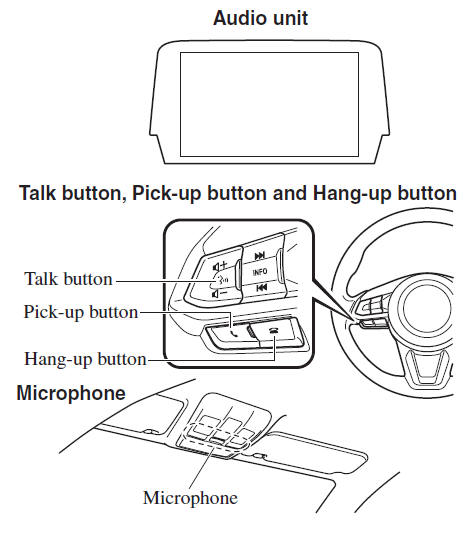
Microphone (hands-free)
The microphone is used for speaking voice commands or when making a Hands-free call.
Talk button, Pick-Up button and Hang-Up button (hands-free)
The basic functions of Bluetooth® Hands-Free can be used for such things as making calls or hanging up using the talk, pick-up and hang-up buttons on the steering wheel.
Commander switch
The commander switch is used for volume adjustment and display operation. Tilt or turn the commander knob to move the cursor. Press the commander knob to select the icon.
Volume adjustment
The volume dial of the commander switch is used to adjust the volume. Turn the dial to the right to increase volume, to the left to decrease it. The volume can also be adjusted using the volume button on the steering wheel.
NOTE
If the volume is lower compared to other audio modes, increase the volume from the device side.
Conversation volume and the volume of the voice guidance and ringtone can each be set in advance.
1. Select the  icon on the home
screen to display the Communication screen.
2. Select  .
.
3. Adjust the  and the
 using the slider.
 Bluetooth®
Bluetooth® Hands-Free outline
When a Bluetooth® device (mobile phone) is connected to the vehicle's Bluetooth®
unit via radio wave transmission, a call can be made or received by pressing the
...
 Bluetooth® Preparation
Device pairing
To use Bluetooth® audio and Hands-Free, the device equipped with Bluetooth® has
to be paired to the unit using the following procedure. A maximum of seven devices
including Bluet ...
Other materials:
Mazda 6 Owners Manual: Bluetooth® Audio
Applicable Bluetooth® specification (Recommended)
Ver. 1.1/1.2/2.0 EDR/2.1
EDR/3.0 (conformity)
Response profile
A2DP (Advanced Audio Distribution Profile) Ver. 1.0/1.2
AVRCP (Audio/Video Remote Control Profile) Ver. 1.0/1.3/1.4
A2DP is a profile which transmits only audio to the Blue ...
Mazda 6 Owners Manual: Making a Call
Phonebook Usage
Telephone calls can be made by saying the contact name in the downloaded phonebook
or the name of a person whose phone number has been registered in the Bluetooth®
Hands-Free. Refer to Import contact (Download Phonebook).
1. Press the talk button.
2. Wait for the beep sound.
...