
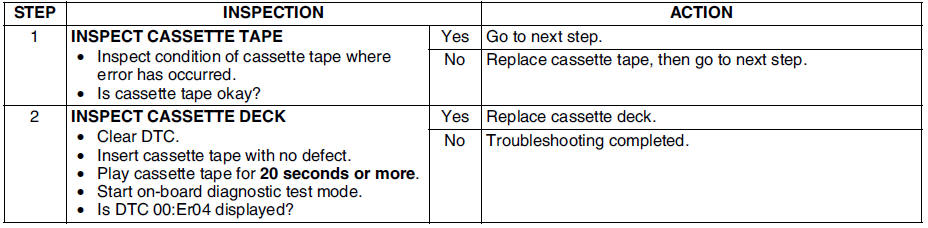
Mazda 6 Service Manual: Dtc 00:er04

Diagnostic procedure
 Dtc 00:er03
Diagnostic procedure
...
 Dtc 05:er01
Diagnostic procedure
...
Other materials:
Mazda 6 Service Manual: Dtc b1318
Caution
When attaching the tester lead to the ABS (ABS/TCS) HU/CM harness
connector, the SST (49 G066 001) must be used. (See ABS (ABS/TCS) HU/CM
INSPECTION.)
Diagnostic procedure
...
Mazda 6 Service Manual: Instrument cluster repair
Note
The needle of speedometer or tachometer may continue to rotate
clockwise until it indicates over maximum graduation. If a customer
complains of this concern, repair the needle position according to the
following steps.
1. Verify the concern.
2. Turn the ignition switch to LOC ...
© 2016-2026 Copyright www.mazda6info.net