
Mazda 6 Service Manual: Dtc b1342
Caution
- When attaching the tester lead to the DSC HU/CM connector the SST (49 G066 004) must be used.

Diagnostic procedure
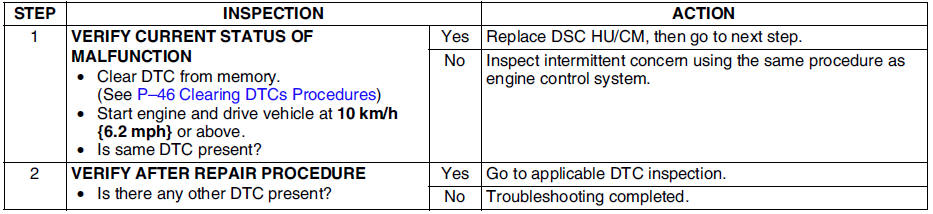
 Dtc b1318
Caution
When attaching the tester lead to the DSC HU/CM connector the SST (49
G066 004) must be used.
Diagnostic procedure
...
 Dtc b1483, b1484, b1486
Caution
When attaching the tester lead to the DSC HU/CM connector the SST
(49 G066 004) must be used.
Diagnostic procedure
...
Other materials:
Mazda 6 Service Manual: Transaxle oil inspection
1. Park the vehicle on level ground.
2. Remove the oil level plug and washer.
3. Verify that the oil is near the brim of the plug port.
If the oil level is lower than the low level, add the specified amount
and type of oil through the oil level plug hole.
Specified oil grade
API Ser ...
Mazda 6 Service Manual: Magnetic clutch adjustment
1. Measure the clearance around the entire circumference between the pressure
plate and A/C compressor pulley using a thickness gauge.
2. Verify that the clearance is within the specification.
If not within the specification, remove the pressure plate and adjust
the clearance by changing ...
© 2016-2026 Copyright www.mazda6info.net