
Mazda 6 Service Manual: Horn removal/installation
1. Disconnect the negative battery cable.
2. Bend the mud guard.
3. Remove in the order indicated in the table.
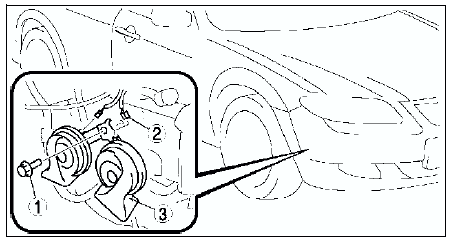

4. Install in the reverse order of removal.
 Oil pressure switch inspection
1. Verify that the oil pressure warning light illuminates when the ignition
switch is at ON position.
2. Verify that the oil pressure warning light goes off when the engine is
started.
If the ...
 Information display removal/installation
1. Disconnect the negative battery cable.
2. Remove the center panel module. (See CENTER PANEL MODULE
REMOVAL/INSTALLATION.)
3. Remove the LCD unit. (with car-navigation system) (See LCD UNIT
RE ...
Other materials:
Mazda 6 Service Manual: Ignition coil inspection
Primary Coil Winding
1. Remove the ignition coil.
2. Measure the resistance between the following lead holes using an ohmmeter.
A and B, B and C
- If not specified, replace the ignition coil.
Specification
0.49-0.57 ohms [20°C {68°F}]
Secondary Coil Winding
1. Remove the igni ...
Mazda 6 Service Manual: Variable air duct (vad) control solenoid valve inspection (l3)
1. Remove the VAD control solenoid valve. (See INTAKE-AIR SYSTEM
REMOVAL/INSTALLATION.)
2. Inspect airflow between the ports under the following conditions.
If not as specified, replace the VAD control solenoid valve.
If as specified, carry out the Circuit Open/Short Inspection.
Circ ...