
Mazda 6 Service Manual: Information display removal/installation
1. Disconnect the negative battery cable.
2. Remove the center panel module. (See CENTER PANEL MODULE REMOVAL/INSTALLATION.)
3. Remove the LCD unit. (with car-navigation system) (See LCD UNIT REMOVAL/INSTALLATION.)
4. Remove the center box. (without car-navigation system)
5. Remove in the order indicated in the table.
6. Install in the reverse order of removal.
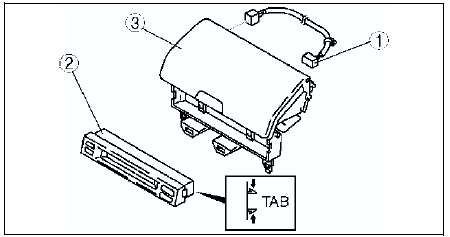
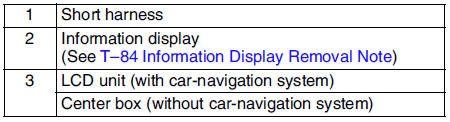
Information Display Removal Note
Squeeze the tabs of information display and pull it forward to it.
 Horn removal/installation
1. Disconnect the negative battery cable.
2. Bend the mud guard.
3. Remove in the order indicated in the table.
4. Install in the reverse order of removal. ...

Other materials:
Mazda 6 Service Manual: General procedures
PRECAUTION (BRAKES)
Wheels and Tires Removal/Installation
1. The removal and installation procedures for the wheels and tires are not
mentioned in this section. When a
wheel is removed, tighten it to 88-118 N·m {9.0-12.0 kgf·m, 65.0-87.0 ft·lbf}.
Brake Lines Disconnection/Connection
Cautio ...
Mazda 6 Service Manual: Solenoid valve inspection
Resistance Inspection (On-Vehicle Inspection)
Caution
Water or foreign objects entering the connector can cause a poor
connection or corrosion. Be sure not to drop water or foreign objects on the
connector when disconnecting it.
1. Disconnect the negative battery cable.
2. Remove the ...