
Mazda 6 Owners Manual: Indication on Display
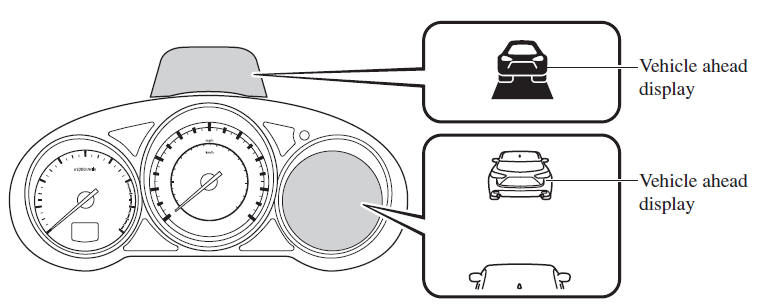
The Distance Recognition Support System (DRSS) operation status is indicated in the active driving display or multi-information display. Regarding malfunctions, check the vehicle conditions or have it inspected by an Authorized Mazda Dealer according to the content of the displayed message.
Refer to Warning/Indicator Lights.
NOTE
- When the ignition is switched off, the operation status before the system was turned off is maintained. For example, if the ignition is switched off with the Distance Recognition Support System (DRSS) operable, the system will be operable when the ignition is switched ON the next time.
- The Distance Recognition Support System (DRSS) can be turned on/off and the system's sensitivity can be changed.
Distance-between-vehicles guidelines*1
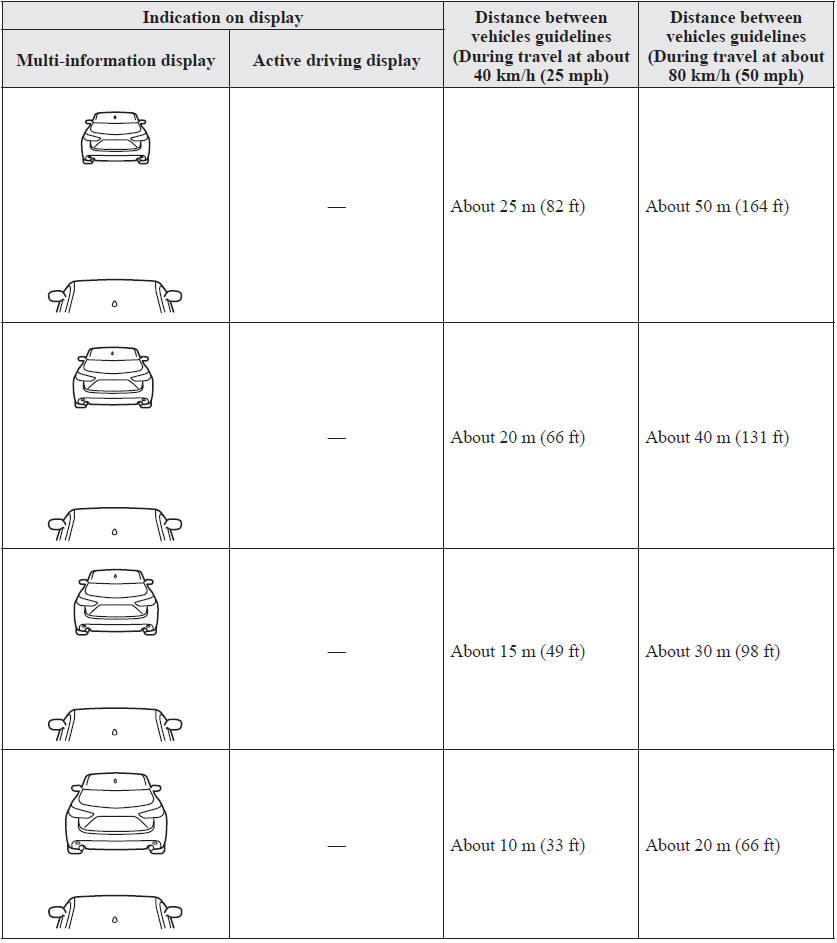
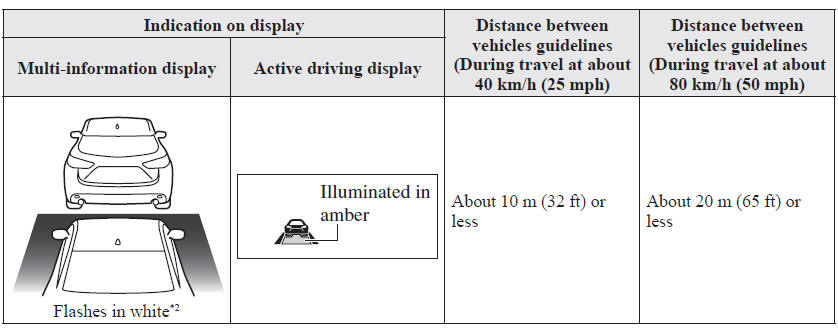
*1 The distance between vehicles differs depending on vehicle speed. *2 Indication when the distance setting for notifying the driver that the vehicle approaches a vehicle ahead is Near.
 Distance Recognition Support System (DRSS) (Some models)
The Distance Recognition Support System (DRSS) measures the distance between
your vehicle and a vehicle ahead using a radar sensor (front) while the vehicle
speed is about 30 km/h (19 mph) or fast ...
 Rear Cross Traffic Alert (RCTA) (Some models)
The Rear Cross Traffic Alert (RCTA) system is designed to assist the driver in
checking the area to the rear of the vehicle on both sides while the vehicle is
reversing by alerting the driver to t ...
Other materials:
Mazda 6 Owners Manual: Basic power window system inspection
Manual Mode Function Inspection
Automatic Mode Function Inspection
Automatic Window Return Function Inspection
IG OFF Timer Function Inspection
Two-step Down Function Inspection
The distance the door glass opens can be changed using the two-step down
function. (Approximately 20- ...
Mazda 6 Owners Manual: Timing chain
TIMING CHAIN REMOVAL/INSTALLATION
Warning
Fuel vapor is hazardous. It can very easily ignite, causing
serious injury and damage. Always keep sparks and flames away from fuel.
Fuel line spills and leakage are dangerous. Fuel can ignite and
cause serious injures or death and damage. Fuel ...