
Mazda 6 Owners Manual: Changing a Flat Tire
NOTE
If the following occurs while driving, it could indicate a flat tire.
- Steering becomes difficult.
- The vehicle begins to vibrate excessively.
- The vehicle pulls in one direction.
If you have a flat tire, drive slowly to a level spot that is well off the road and out of the way of traffic to change the tire. Stopping in traffic or on the shoulder of a busy road is dangerous.
WARNING
Be sure to follow the directions for changing a tire:
Changing a tire is dangerous if not done properly. The vehicle can slip off the jack and seriously injure someone.
No person should place any portion of their body under a vehicle that is supported by a jack.
Never allow anyone inside a vehicle supported by a jack:
Allowing someone to remain in a vehicle supported by a jack is dangerous. The occupant could cause the vehicle to fall resulting in serious injury.
NOTE
Make sure the jack is well lubricated before using it.
1. Park on a hard, level surface off the right-of-way and firmly set the parking brake.
2. Put a vehicle with an automatic transaxle in Park (P), a manual transaxle in Reverse (R) or 1, and turn off the engine.
3. Turn on the hazard warning flasher.
4. Have everyone get out of the vehicle and away from the vehicle and traffic.
5. Remove the jack, tool, and spare tire.
6. Block the wheel diagonally opposite the flat tire. When blocking a wheel, place a tire block both in front and behind the tire.
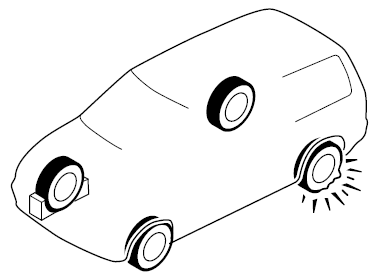
NOTE
When blocking a tire, use rocks or wood blocks of sufficient size if possible to hold the tire in place.
 Spare Tire
Your Mazda has a temporary spare tire. The temporary spare tire is lighter and
smaller than a conventional tire, and is designed only for emergency use and should
be used only for VERY short perio ...
 Removing a Flat Tire
1. Loosen the lug nuts by turning them counterclockwise one turn each, but do
not remove any lug nuts until the tire has been raised off the ground.
2. Place the jack on the ground.
3. Turn the ...
Other materials:
Mazda 6 Owners Manual: Egr valve inspection
Operation Test
Carry out the EGR Control Inspection. (See EGR Control System
Inspection.
If not as specified, perform the further inspection for the EGR valve.
Resistance Inspection
Note
Perform the following test only when directed.
1. Disconnect the negative battery cable.
2. In ...
Mazda 6 Owners Manual: Hold switch inspection
Operating Inspection
1. Turn the ignition switch to ON (engine OFF).
2. Verify that the HOLD indicator light is not illuminated. Depress the HOLD
switch and verify that the HOLD indicator light illuminates.
If not as specified, inspect the terminal voltage of the HOLD switch.
Voltage Insp ...