
Mazda 6 Service Manual: Hold switch inspection
Operating Inspection
1. Turn the ignition switch to ON (engine OFF).
2. Verify that the HOLD indicator light is not illuminated. Depress the HOLD switch and verify that the HOLD indicator light illuminates.
- If not as specified, inspect the terminal voltage of the HOLD switch.
Voltage Inspection
1. Remove the console.
2. Turn the ignition switch to ON (engine OFF).
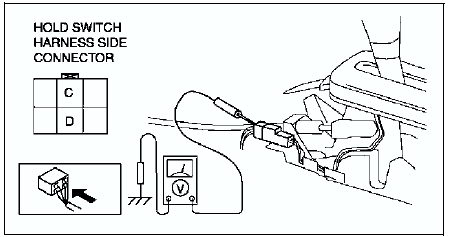
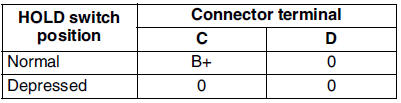
3. Measure the voltage at the HOLD switch connector.
- If not as specified, inspect for continuity at the HOLD switch.
Continuity Inspection of
1. Disconnect the negative battery cable.
2. Remove the console.
3. Disconnect the HOLD switch connector.
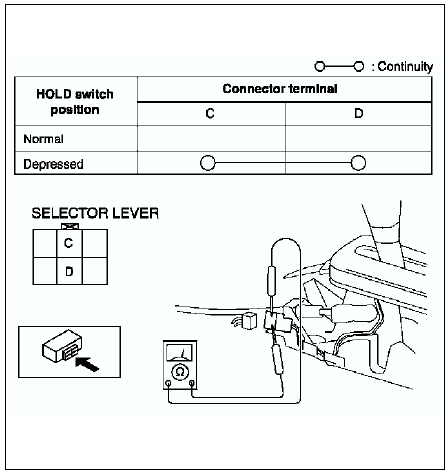
4. Inspect continuity at the HOLD switch.
- If the switch is okay, inspect the wiring harness. (HOLD switch-PCM, HOLD switch-Body ground)
- If not as specified, replace the HOLD switch. (See HOLD SWITCH REMOVAL/INSTALLATION.)
5. Connect the HOLD switch connector.
6. Install the console.
7. Connect the negative battery cable.
 Automatic transaxle fluid (atf) replacement
Warning
When the transaxle and ATF are hot, they can badly burn you. Turn
off the engine and wait until they are cool before changing the ATF.
1. Remove the oil dipstick.
2. Remove the oil ...
 Hold switch removal/installation
1. Disconnect the negative battery cable.
2. Remove the console.
3. Disconnect the connector and remove the HOLD switch terminals. (See
SELECTOR LEVER DISASSEMBLY/ASSEMBLY.)
4. Remove the select ...
Other materials:
Mazda 6 Service Manual: Front and rear fog light switch inspection
Light switch LH side
1. Remove the light switch. (See LIGHT SWITCH REMOVAL/INSTALLATION.)
2. Inspect for continuity between the light switch terminals using an
ohmmeter.
If not as specified, replace the light switch.
Light switch RH side
1. Remove the light switch. (See LIGHT SWITCH ...
Mazda 6 Service Manual: Split Folding
By lowering the rear seatbacks the luggage compartment space can be expanded.
WARNING
Do not drive the vehicle with occupants on folded down seatbacks or in
the luggage compartment. Putting occupants in the luggage compartment
is dangerous because seat belts cannot be fastened which coul ...