
Mazda 6 Service Manual: Instrument cluster inspection
Speedometer
Using the input/output check mode
Inspect the speedometer by setting it in the input/output check mode DTC 12.
Using a speedometer tester
1. Adjust the tire air pressure to the specification.
2. Using a speedometer tester, verify that the speedometer indication is within the allowable ranges shown below.
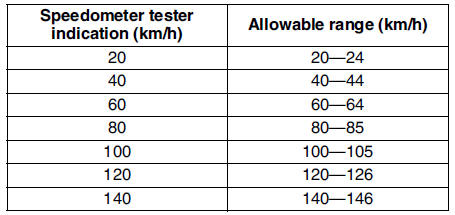
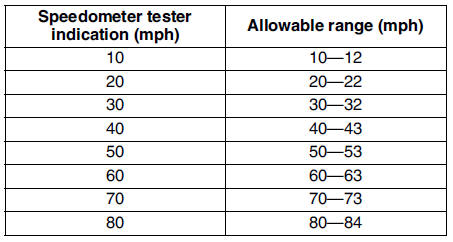
3. Verify that fluctuation of the speedometer needle is within the allowable range.
- If the speedometer needle does not move or the indication is outside of the allowable range, inspect the ABS (ABS/TCS) HU/CM (vehicles with ABS (ABS/TCS), DSC HU/CM (vehicles with DSC), PCM (vehicles without ABS) and related wiring harness.
- If the ABS (ABS/TCS) HU/CM (vehicles with ABS (ABS/TCS), DSC HU/CM (vehicles with DSC), PCM (vehicles without ABS) and related wiring harness are normal, replace the instrument cluster.
Needle fluctuation allowable range Within 3.0 km/h
Tachometer
Using the input/output check mode
Inspect the tachometer by setting it in the input/output check mode DTC 13.
Using the SSTs (WDS or equivalent)
Caution
- If the engine speed exceeds the allowable range, the engine could be damaged. Therefore, when inspecting the tachometer, do not allow the engine speed to exceed the allowable range indication Bon the tachometer.
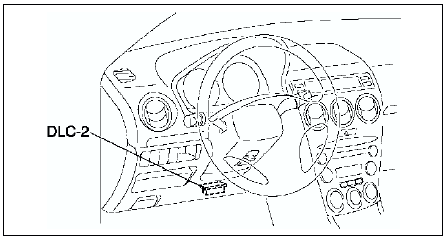
1. Connect the SSTs
(WDS or equivalent) to the vehicle DLC-2 16-pin connector.
2. Access and monitor PIDs by SSTs
(WDS or equivalent).
Fuel Gauge
Inspect the fuel gauge by setting it in the input/output check mode DTC 23.
Water Temperature Gauge
Inspect the water temperature gauge by setting it in the input/output check mode DTC 25.
 Instrument cluster disassembly/assembly
Caution
If the instrument cluster is dropped or the print plate is damaged,
the system will not work properly and it may be the cause of trouble or
malfunctions.
1. Disassemble in the ord ...
 Instrument cluster repair
Note
The needle of speedometer or tachometer may continue to rotate
clockwise until it indicates over maximum graduation. If a customer
complains of this concern, repair the needle position ...
Other materials:
Mazda 6 Service Manual: Tires
For reasons of proper performance, safety, and better fuel economy, always maintain
recommended tire inflation pressures and stay within the recommended load limits
and weight distribution.
WARNING
Using Different Tire Types: Driving your vehicle with different types
of tires is dangerous. I ...
Mazda 6 Service Manual: How to use AUX mode
1. Select the icon on the home
screen to display the Entertainment screen.
2. Select to switch to the AUX
mode. The following icons are displayed in the lower part of the center display.
NOTE
If a device is not connected to the auxiliary jack, the mode does not
switch to the AUX mod ...