
Mazda 6 Service Manual: No. 1 one or more on-board diagnostic functions inoperative
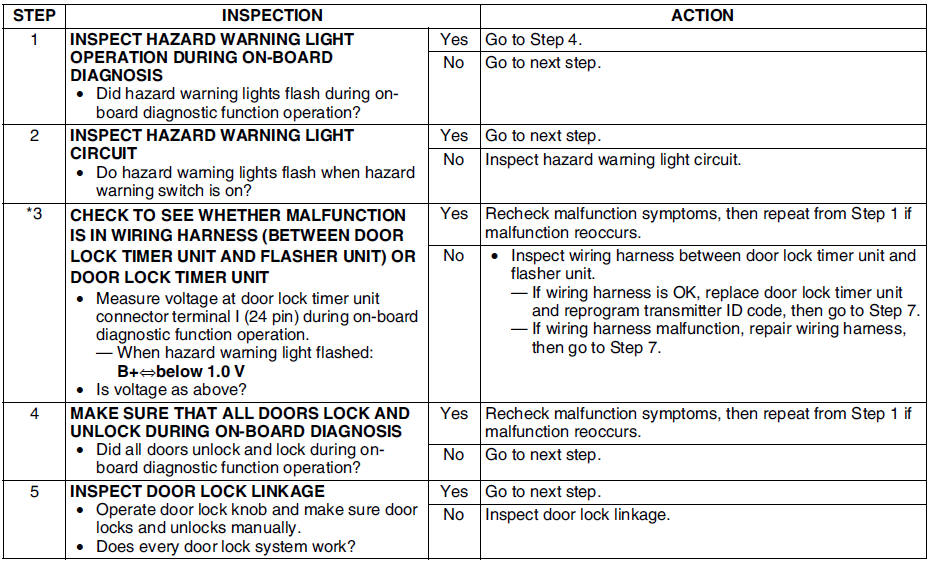
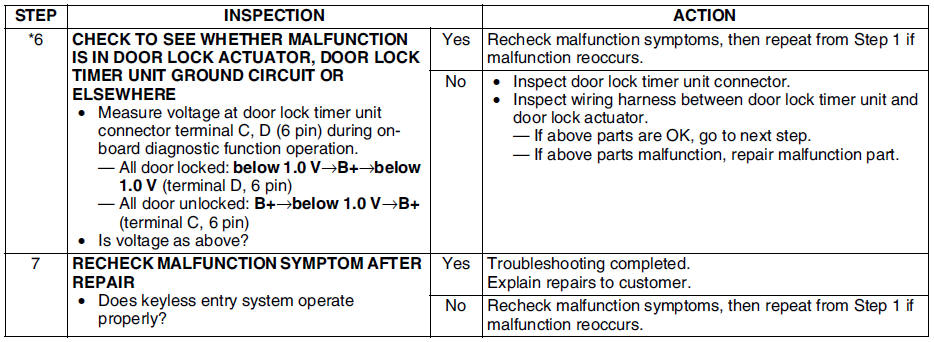
- When performing an asterisked (*) troubleshooting inspection, shake the wiring harness and connectors while doing the inspection to discover whether poor contact points are the cause of any intermittent malfunctions. If there is a problem, check to make sure connectors, terminals and wiring harnesses are connected correctly and undamaged.
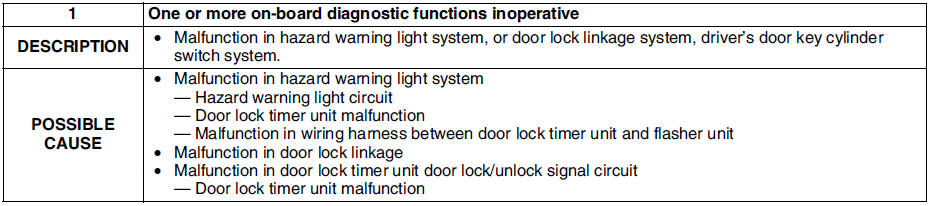
Diagnostic procedure
Note
- For with theft-deterrent system, follow the procedure from Step 4.

 No. 2 all on-board diagnostic functions inoperative
When performing an asterisked (*) troubleshooting inspection, shake the
wiring harness and connectors while doing the inspection to discover whether
poor contact points are the cause of any i ...
Other materials:
Mazda 6 Service Manual: Rear map light removal/installation
1. Disconnect the negative battery cable.
2. Remove in the order indicated in the table.
3. Install in the reverse order of removal.
Rear Map Light Removal Note
1. Insert a tape-wrapped flathead screwdriver into the gap between the
headliner and the rear map light.
2. Push the hooks to re ...
Mazda 6 Service Manual: Rear outer handle removal/installation
1. Remove the rear door glass.
2. Remove the rear door unit.
3. Remove the rear door latch.
4. Remove the bolts.
5. Detach the rear outer handle and rear door latch rod.
6. With the rear side of the rear outer handle fixed and the outer handle
lever pulled out (1), remove the rear side of t ...