
Mazda 6 Service Manual: No.3 abs warning light does not illuminate with ignition switch on
Mazda 6 Service Manual / Braking system / Troubleshooting (abs/tcs/dynamic stability control) / No.3 abs warning light does not illuminate with ignition switch on

Diagnostic procedure
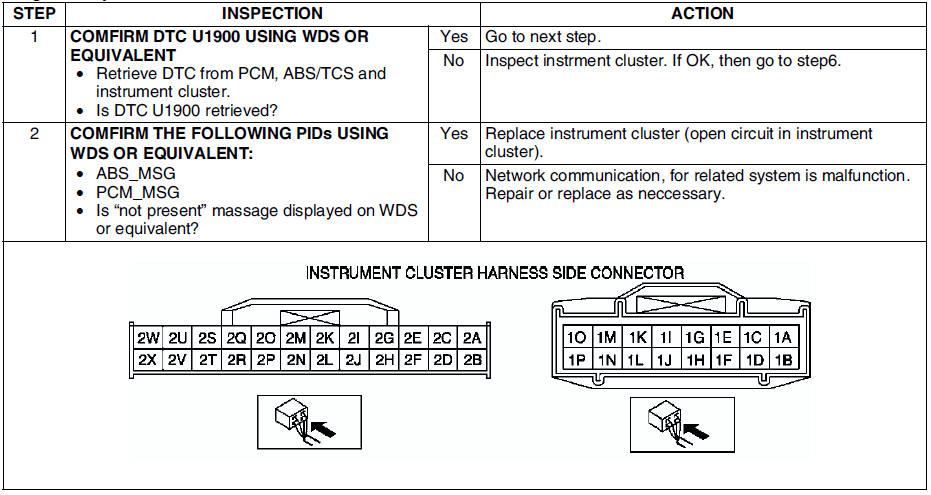
 No.2 neither abs warning light nor brake system warning lightilluminate with
ignition switch on
No.2 neither abs warning light nor brake system warning lightilluminate with
ignition switch on
When performing an asterisked (*) troubleshooting inspection, shake the
wiring harness and connectors while doing the inspection to discover whether
poor contact points are the cause of a ...

Other materials:
Mazda 6 Service Manual: Front lower arm (rear) inspection
1. Remove the lower arm (rear) from the vehicle.
2. Inspect for damage, cracks, and bending.
3. Inspect the ball joint rotation torque.
(1) Rotate the ball joint five times.
(2) Measure the rotation torque using a suitable allen socket and a
torque wrench.
If not within the specif ...
Mazda 6 Service Manual: Woofer removal/installation
4SD
1. Disconnect the negative battery cable.
2. Remove the rear package trim.
3. Remove in the order indicated in the table.
4. Install in the reverse order of removal.
5HB
1. Disconnect the negative battery cable.
2. Remove in the order indicated in the table.
3. Install in the rev ...
© 2016-2026 Copyright www.mazda6info.net