
Mazda 6 Owners Manual: Operating Tips for USB device
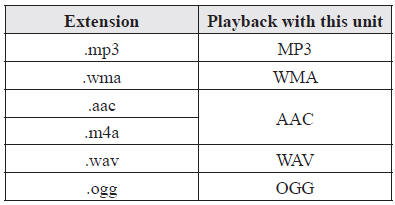
This unit plays audio files as follows:
CAUTION
Do not use an audio file extension on files other than audio files. In addition, do not change the audio file extension. Otherwise, the unit will not recognize the file correctly resulting in noise or a malfunction.
NOTE
- Playback may not be possible depending on the type and condition of the USB flash memory even if the audio file complies with the standard above.
- A copyright protected WMA/AAC file cannot be played in this unit.
- The order of the music data stored in the device may differ from the playback order.
- To prevent loss or damage of stored data, we recommend that you always back up your data.
- If a device exceeds the maximum electric current value of 1,000 mA, it may not operate or recharge when connected.
- Do not pull out the USB device while in the USB mode (only pull it out while in FM/AM radio or CD mode).
- The device will not operate if the data is password protected.
MP3/WMA/AAC/OGG files written under specifications other than the indicated specification may not play normally or files/folder names may not display correctly.
 Operating Tips for OGG
OGG is the audio compression format for Xiph. Org Foundation.
Audio data can be created and stored at a higher compression ratio than MP3.
This unit plays files with the extension (.ogg) as OGG file ...
 Audio Set
NOTE
The explanation of functions described in this manual may differ from the
actual operation, and the shapes of screens and buttons and the letters and characters
displayed may also differ fro ...
Other materials:
Mazda 6 Owners Manual: Thermostat
THERMOSTAT REMOVAL/INSTALLATION
1. Remove the plug hole plate.
2. Disconnect the negative battery cable.
3. Drain the engine coolant. (See COOLING SYSTEM SERVICE WARNINGS.)
4. Remove the drive belt. (See DRIVE BELT REPLACEMENT.)
5. Remove the washer tank.
6. Remove the P/S oil pump.
Note
...
Mazda 6 Owners Manual: Inspecting Engine Oil Level
1. Be sure the vehicle is on a level surface.
2. Warm up the engine to normal operating temperature.
3. Turn it off and wait at least 5 minutes for the oil to return to the oil pan.
4. Pull out the dipstick, wipe it clean, and reinsert it fully.
5. Pull it out again and examine the level.
The ...