
Mazda 6 Service Manual: Rear door speaker removal/installation
1. Disconnect the negative battery cable.
2. Remove the rear door trim.
3. Remove in the order indicated in the table.
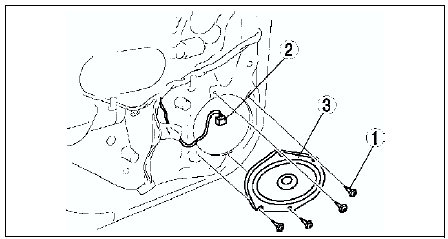
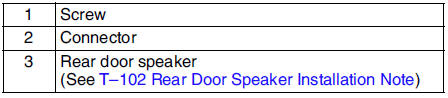
4. Install in the reverse order of removal.
Rear Door Speaker Installation Note
Attach the speaker with the wiring harness placed in the groove of the door unit panel.
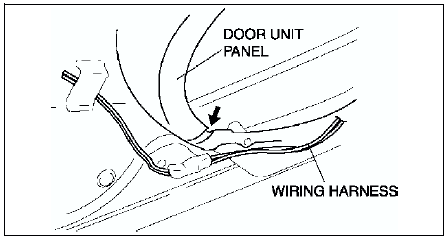
Caution
- If the speaker is attached with the harness placed outside of the groove, the wiring harness might be broken.
 Front door speaker inspection
1. Inspect for resistance between the front door speaker terminals using an
ohmmeter.
If not as specified, replace the front door speaker.
2. To verify that the front door speaker outputs ...
 Rear door speaker inspection
1. Inspect for resistance between the rear door speaker terminals using an
ohmmeter.
If not as specified, replace the rear door speaker.
2. To verify that the rear door speaker outputs so ...
Other materials:
Mazda 6 Service Manual: Abs (abs/tcs) hu/cm removal/installation
Caution
When replacing the ABS (ABS/TCS) HU/CM, configuration procedure
must be done before removing the ABS (ABS/TCS) HU/CM. If configuration is
not completed before removing the ABS (ABS/TCS) HU/CM, TCS will not work
properly (with TCS model).
Do not drop the ABS (ABS/TCS) HU/CM. Re ...
Mazda 6 Service Manual: Manually Shifting Up
You can shift gears up by operating the selector lever or the steering shift
switches (some models).
M1 → M2 → M3 → M4 → M5 → M6
Using selector lever
To shift up to a higher gear, tap the selector lever back (+) once.
Using steering shift switch (some models)
To ...