
Mazda 6 Owners Manual: Rearview Mirror
WARNING
Do not stack cargo or objects higher than the seatbacks:
Cargo stacked higher than the seatbacks is dangerous. It can block your view in the rearview mirror, which might cause you to hit another car when changing lanes.
Rearview mirror adjustment
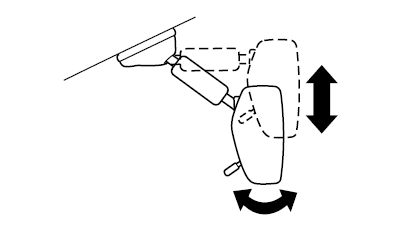
Before driving, adjust the rearview mirror to center on the scene through the rear window.
NOTE
For the manual day/night mirror, perform the adjustment with the day/night lever in the day position.
Reducing glare from headlights
Manual day/night mirror
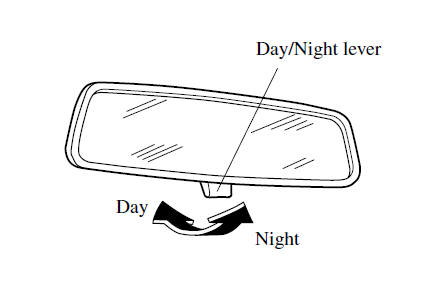
Push the day/night lever forward for day driving. Pull it back to reduce glare of headlights from vehicles at the rear.
Auto-dimming mirror
The auto-dimming mirror automatically reduces the glare of headlights from vehicles at the rear when the ignition is switched ON.
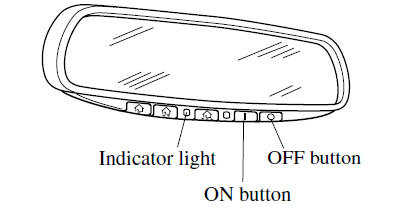
Press the OFF button  to cancel the auto-dimming
function. The indicator light will turn off.
To reactivate the auto-dimming function, press the ON button
 . The indicator light will illuminate.
NOTE
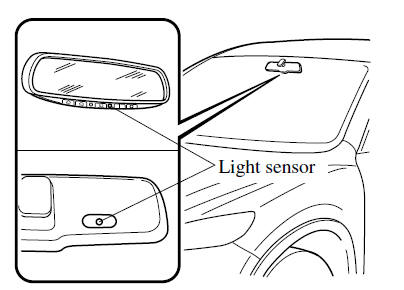
- Do not use glass cleaner or suspend objects on or around the light sensor. Otherwise, light sensor sensitivity will be affected and may not operate normally.
- For information regarding the 3 buttons (
 ,
,  ,
,
) on the auto-dimming mirror.Refer to HomeLink Wireless Control System.
- The auto-dimming function is canceled when the ignition is switched ON and the shift/selector lever is in reverse (R).
 Outside Mirrors
WARNING
Be sure to look over your shoulder before changing lanes: Changing
lanes without taking into account the actual distance of the vehicle in the convex
mirror is dangerous. You could have a ...
 Windows
...
Other materials:
Mazda 6 Owners Manual: Tire Rotation
WARNING
Rotate tires periodically: Irregular tire wear is dangerous. To equalize
tread wear for maintaining good performance in handling and braking, rotate the
tires every 12,000 km (7,500 miles). However Mazda recommends to rotate every 8,000
km (5,000 miles) to help increase tire life and ...
Mazda 6 Owners Manual: Replacing a Wheel
WARNING
Always use wheels of the correct size on your vehicle: Using a wrong-sized
wheel is dangerous. Braking and handling could be affected, leading to loss of control
and an accident.
CAUTION
A wrong-sized wheel may adversely affect:
Tire fit
Wheel and bearing life
Ground clearance ...