
Mazda 6 Service Manual: Resistor removal/installation
1. Disconnect the negative battery cable.
2. Remove the glove compartment.
3. Remove the car navigation unit. (See CAR-NAVIGATION UNIT REMOVAL/INSTALLATION.)
4. Remove in the order indicated in the table.
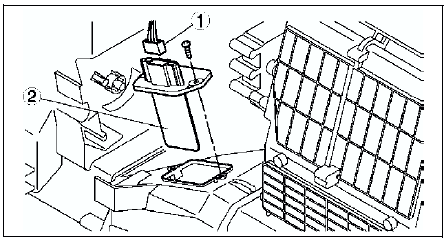

5. Install in the reverse order of removal.
 Blower motor inspection
Connect battery positive voltage to terminal A and ground to terminal B of
the blower motor and verify its operation.
If not as specified, replace the blower motor.
...
 Resistor inspection
Verify that the resistance between the terminals of the resistor is as shown
in the table.
If not as specified, replace the resistor.
POWER MOS FET REMOVAL/INSTALLATION
(See RESISTOR REM ...
Other materials:
Mazda 6 Service Manual: Climate control unit wire adjustment
Air Mix Wire
1. Set the temperature control dial at max cold.
2. Set the air mix link to max cold in the direction shown by the arrow and
insert a screwdriver at the set hole.
3. Connect the air mix wire to air mix link.
4. Clamp the air mix wire to wire clamp.
5. Verify that the temperatur ...
Mazda 6 Service Manual: Driving on Uneven Road
Your vehicle's suspension and underbody can be damaged if driven on rough/uneven
roads or over speed bumps at excessive speeds. Use care and reduce speed when traveling
on rough/uneven roads or over speed bumps.
Use care not to damage the vehicle's underbody, bumpers or muffler(s) when driving ...