
Mazda 6 Owners Manual: Settings
NOTE
Depending on the grade and specification, the screen display may differ.
Select the  icon on the home
screen and display the Settings screen.
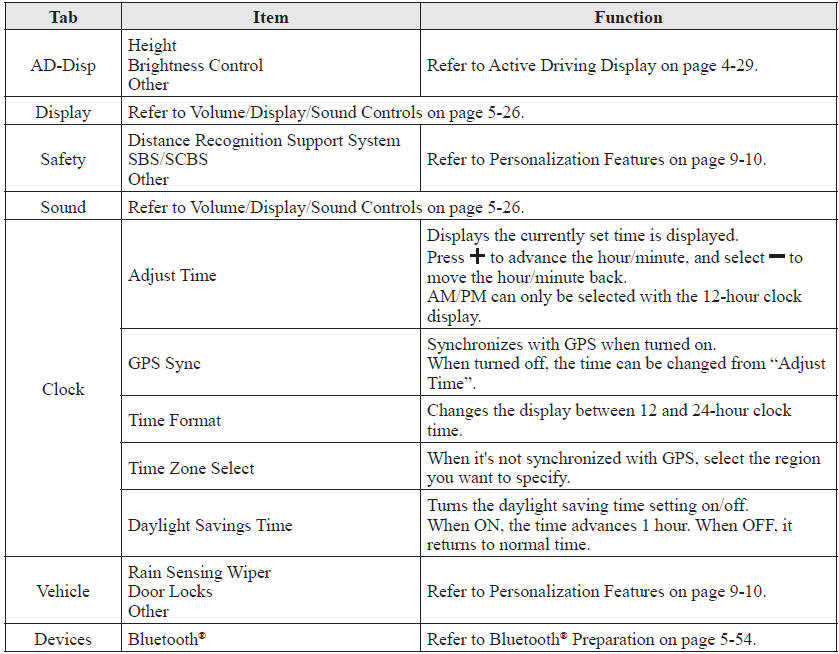
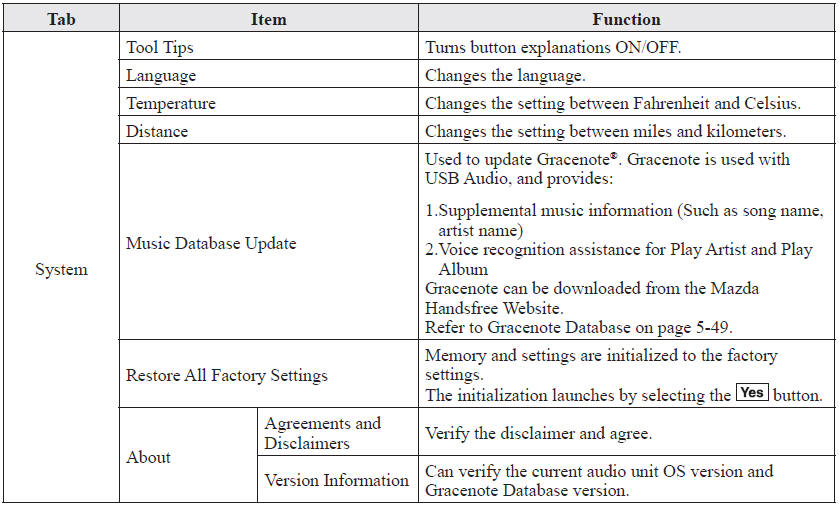
Switch the tab and select the setting item you want to change.
You can customize settings in the setup display as follows:
 How to use Auxiliary jack/USB port
Audio can be heard from the vehicle's speakers by connecting a commerciallyavailable
portable audio unit to the auxiliary jack.
Use a commercially-available, nonimpedance (3.5 ) stereo mini plug ca ...
 Applications
NOTE
Depending on the grade and specification, the screen display may differ.
Select the icon on the home screen
to display the Applications screen. The following information can be verified.
...
Other materials:
Mazda 6 Owners Manual: Panel light control switch removal/installation
1. Disconnect the negative battery cable.
2. Remove in the order indicated in the table.
3. Install in the reverse order of removal.
Panel Light Control Switch Removal Note
1. Insert your hand from the lower side of the dashboard and squeeze the tabs
of the panel light control switch.
2. ...
Mazda 6 Owners Manual: Exhaust system
EXHAUST SYSTEM INSPECTION
Start the engine and inspect each exhaust system component for exhaust gas
leakage.
If leakage is found, repair or replace as necessary.
EXHAUST SYSTEM REMOVAL/INSTALLATION
Warning
When the engine and exhaust system are hot, they can badly burn.
Turn off t ...