
Mazda 6 Service Manual: Starting procedure for on-board diagnostic test mode
Note
- All DTCs displayed in the on-board diagnostic test mode should be entered in the Audio Repair Order Form.
1. Turn the ignition switch to the ACC or ON position.
2. First press the POWER button, then simultaneously press the AM button and TAPE/MD button for 2 seconds or more.
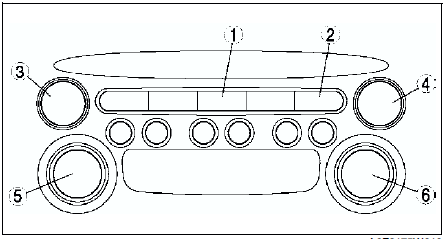
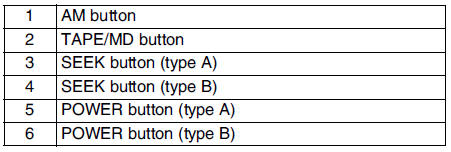
Note
- If several DTCs are in the memory, they can be displayed by the SEEK button.
3. To stop the on-board diagnostic test mode, turn the ignition switch to the LOCK position.

 Supplier identification procedure
Note
When asking the supplier (service center) for repair or
replacement, verify which supplier the module belongs to and enter in the
Audio Repair Order Form.
Identification With Printed ...
Other materials:
Mazda 6 Service Manual: Dtc clearing procedure
1. Start the on-board diagnostic test mode.
2. First press the POWER button, then simultaneously press AUDIO CONT button
for 2 seconds or more.
Caution
Before clearing the DTCs, be sure to enter all of them displayed
in the on-board diagnostic test mode in the Audio Repair Order Form. ...
Mazda 6 Service Manual: Customer Assistance (U.S.A.)
Your complete and permanent satisfaction is our business. We are here to serve
you. All Authorized Mazda Dealers have the knowledge and the tools to keep your
Mazda vehicle in top condition.
If you have any questions or recommendations for improvement regarding the service
of your Mazda vehic ...