
Mazda 6 Service Manual: Inboard combination light removal/installation
1. Disconnect the negative battery cable.
2. Remove the trunk lid trim (liftgate lower trim). (See TRUNK LID TRIM REMOVAL/INSTALLATION) (See LIFTGATE LOWER TRIM REMOVAL/INSTALLATION)
3. Remove in the order indicated in the table.
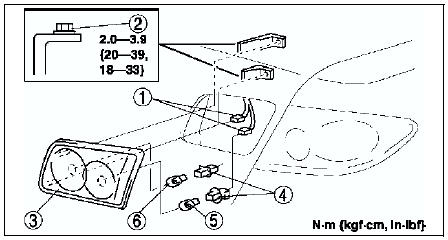
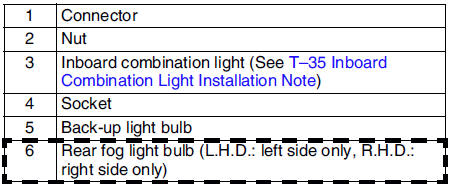
4. Install in the reverse order of removal.
Inboard Combination Light Installation Note
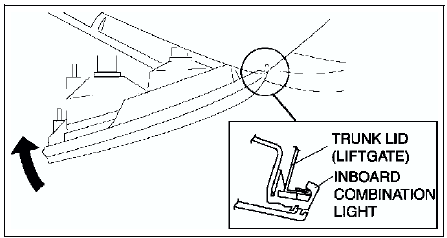
1. Insert the inboard combination light into the trunk lid (liftgate) as shown in the figure, then pivot it inward and fix in place.
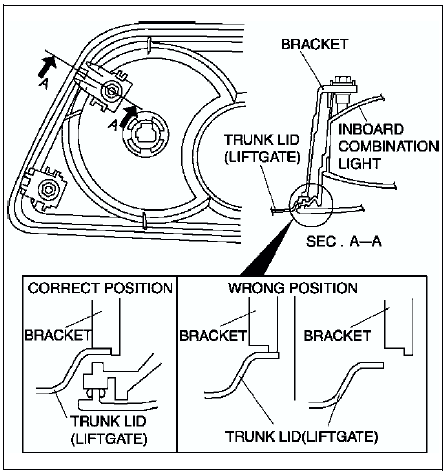
2. Pleace the bracket in the proper position as shown in the figure and press it to the trunk lid (liftgate) to attach.
 Rear combination light removal/installation
1. Disconnect the negative battery cable.
2. Remove the trunk side trim. (See TRUNK SIDE TRIM REMOVAL/INSTALLATION)
3. Remove in the order indicated in the table.
4. Install in the reverse orde ...
 High-mount brake light removal/installation
4SD
In-vehicle-type
1. Disconnect the negative battery cable.
2. Remove in the order indicated in the table.
3. Install in the reverse order of removal.
Rear spoiler type
1. Disconnect the n ...
Other materials:
Mazda 6 Service Manual: Steering gear and linkage removal/installation
Caution
Performing the following procedures without first removing the ABS
wheel-speed sensor may possibly cause an open circuit in the harness if it
is pulled by mistake. Before performing the following procedures, remove the
ABS wheel-speed sensor (axle side) and fix it to an appropri ...
Mazda 6 Service Manual: Active Adaptive Shift (AAS)
Active Adaptive Shift (AAS) automatically controls the transaxle shift points
to best suit the road conditions and driver input. This improves driving feel. The
transaxle may switch to AAS mode when driving up and down slopes, cornering, driving
at high elevations, or depressing the accelerato ...