
Mazda 6 Service Manual: Trunk side trim removal/installation
4SD
1. Remove the trunk end trim.
2. Remove the fasteners, then remove the trunk side trim.
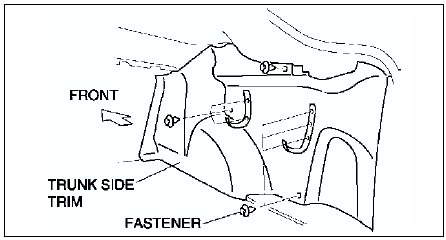
3. Install in the reverse order of removal.
5HB
1. Remove the trunk end trim.
2. Remove the trunk side upper trim.
3. Remove the cargo hooks.
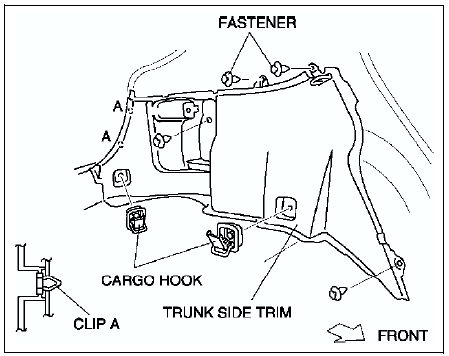
4. Remove the fasteners.
5. Pull the trunk side trim toward you, then disengage clips A from the body.
6. Install in the reverse order of removal.
 Rear package trim removal/installation
1. Remove the high-mount brake light.
2. Fold the rear seat back.
3. Remove the fasteners.
4. Pull the rear package trim upward, then disengage the clips from the body.
5. Disengage the hooks, t ...
 Trunk side upper trim removal/installation
1. Disconnect the negative battery cable. (LH only)
2. Remove the tire house trim.
3. Remove the rear seat remote lever.
4. Remove the screw.
5. Pull the trunk side upper trim toward you, then d ...
Other materials:
Mazda 6 Service Manual: Moonroof (Some models)
The moonroof can be opened or closed electrically only when the ignition is switched
ON.
WARNING
Do not let passengers stand up or extend part of the body through the open
moonroof while the vehicle is moving: Extending the head, arms, or other parts
of the body through the moonroof is dan ...
Mazda 6 Service Manual: Storage Compartments
WARNING
Keep storage boxes closed when driving: Driving with the storage
boxes open is dangerous. To reduce the possibility of injury in an accident or a
sudden stop, keep the storage boxes closed when driving.
Do not put articles in storage spaces with no lid: Putting articles
in storage sp ...