
Mazda 6 Owners Manual: Variance Between Actual Road Conditions and Displayed Image
Some variance occurs between the actual road and the displayed road. Such variance in distance perspective could lead to an accident. Note the following conditions that may cause a variance in distance perspective.
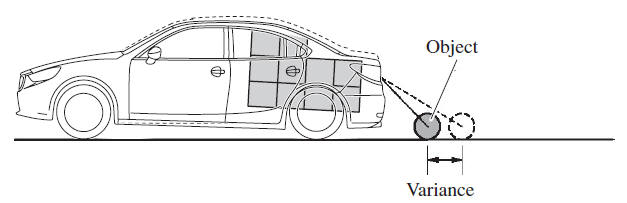
When the vehicle is tilted due to the weight of passengers and load
When the vehicle rear is lowered, the object displayed on the screen appears farther than the actual distance.
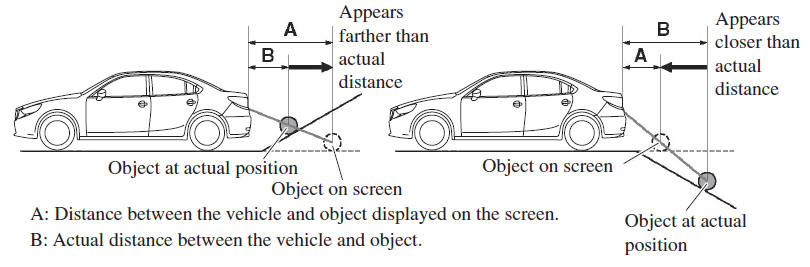
When there is a steep grade behind the vehicle
When there is a steep upgrade (downgrade) behind the vehicle, the object displayed on the screen appears farther (downgrade: closer) than the actual distance.
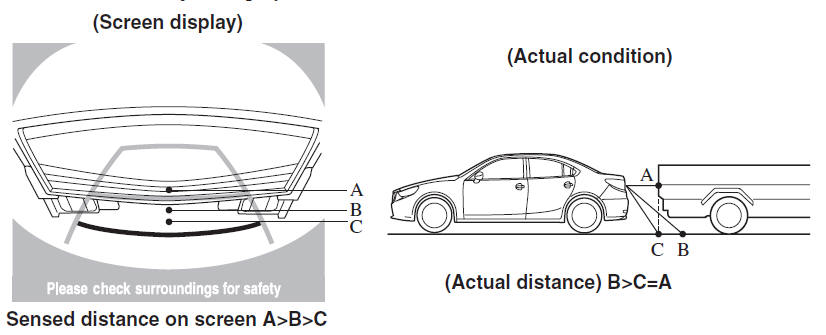
Three-dimensional object on vehicle rear
Because the distance guide lines are displayed based on a flat surface, the distance to the three-dimensional object displayed on the screen is different from the actual distance.
 Rear View Monitor Operation
The operation of the rear view monitor when reversing the vehicle varies depending
on the traffic, road, and vehicle conditions. The amount of steering and the timing
also varies depending on cond ...
 Picture Quality Adjustment
WARNING
Always adjust the picture quality of the rear view monitor while the vehicle
is stopped: Do not adjust the picture quality of the rear view monitor while
driving the vehicle. Adjusting th ...
Other materials:
Mazda 6 Owners Manual: Call Interrupt
A call can be interrupted to receive an incoming call from a third party.
When is selected or the pickup
button on the steering wheel is pressed, the current call is held and the system
switches to the new incoming call.
When is selected, the current
call is ended and the system switches t ...
Mazda 6 Owners Manual: Ignition coil inspection
Primary Coil Winding
1. Remove the ignition coil.
2. Measure the resistance between the following lead holes using an ohmmeter.
A and B, B and C
- If not specified, replace the ignition coil.
Specification
0.49-0.57 ohms [20°C {68°F}]
Secondary Coil Winding
1. Remove the igni ...