
Mazda 6 Owners Manual: Rear View Parking Camera Location
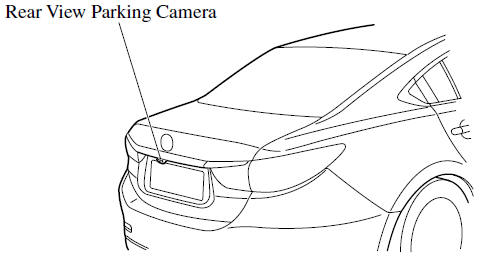
- Switching to the Rear View Monitor Display
- Displayable Range on the Screen
- Viewing the Display
- Rear View Monitor Operation
- Variance Between Actual Road Conditions and Displayed Image
- Picture Quality Adjustment
 Rear View Monitor
The rear view monitor provides visual images of the rear of the vehicle when
reversing.
WARNING
Always drive carefully confirming the safety of the rear and the surrounding
conditions by looking ...
 Switching to the Rear View Monitor Display
Shift the shift lever to R with the ignition switched ON to switch the display
to the rear view monitor display.
NOTE
When the shift lever is shifted from R to another shift lever position, the
...
Other materials:
Mazda 6 Owners Manual: Disconnection of the negative battery cable
Before beginning any work, turn the ignition switch to LOCK position,
then disconnect the negative battery cable and wait for more than 1 minute
to allow the backup power supply of the SAS unit to deplete its stored
power. Disconnecting the battery cable will delete the memories of the
...
Mazda 6 Owners Manual: Cruise Control (Some models)
With cruise control, you can set and automatically maintain any speed of more
than about 25 km/h (16 mph).
WARNING
Do not use the cruise control under the following conditions: Using
the cruise control under the following conditions is dangerous and could result
in loss of vehicle control.
...
© 2016-2026 Copyright www.mazda6info.net