
Mazda 6 Service Manual: Dashboard removal/installation
1. Disconnect the negative battery cable.
2. Remove the glove compartment.
3. Remove the console.
4. Remove the meter hood.
5. Remove the instrument cluster.
6. Remove the column cover.
7. Remove the lower panel.
8. Remove the steering shaft.
9. Remove the A-pillar trims.
10. Remove the front scuff plates.
11. Remove the front side trims.
12. Remove the side panels.
13. For vehicles equipped with the wire-type climate control unit, disconnect the wires for the front A/C unit. (See to CLIMATE CONTROL UNIT REMOVAL.) (See to CLIMATE CONTROL UNIT INSTALLATION.)
14. Disconnect the dashboard harness connectors.
15. Remove the bolts.
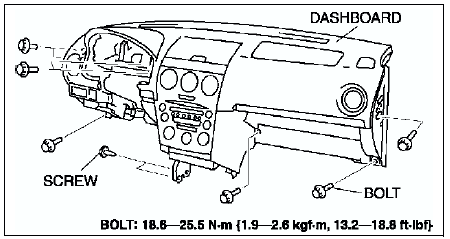
Warning
- Removing the dashboard without supporting it can be dangerous. The dashboard may fall and injure you. Always perform these procedures together with at least another person.
16. Pull out the support pins from the body to remove the dashboard.
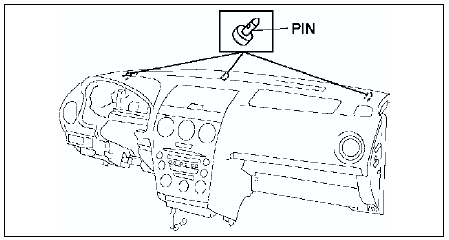
17. Take the dashboard off from the driver-side door opening.
18. Install in the reverse order of removal.

 Dashboard disassembly/assembly
1. Remove the passenger-side air bag module.
2. Remove the ventilator grilles.
3. Remove the audio unit.
4. Remove the climate control unit.
5. Disassemble in the order indicated in the table.
6. ...
Other materials:
Mazda 6 Service Manual: Headliner removal/installation
1. Disconnect the negative battery cable.
2. Turn the seaming welt and weatherstrip over.
3. Remove the sunroof seaming welt. (vehicles with sunroof only)
4. Remove the A-pillar trims.
5. Remove the B-pillar upper trims.
6. Remove the C-pillar trims.
7. Remove the front and rear map light. (Se ...
Mazda 6 Service Manual: Rear Window Defogger
The rear window defogger clears fog from the rear window.
The ignition must be switched ON to use the defogger.
Press the switch to turn on the rear window defogger. The rear window defogger
operates for about 15 minutes and then turns off automatically.
The indicator light illuminates when the ...