
Mazda 6 Service Manual: Dtc 59

Diagnostic Procedure
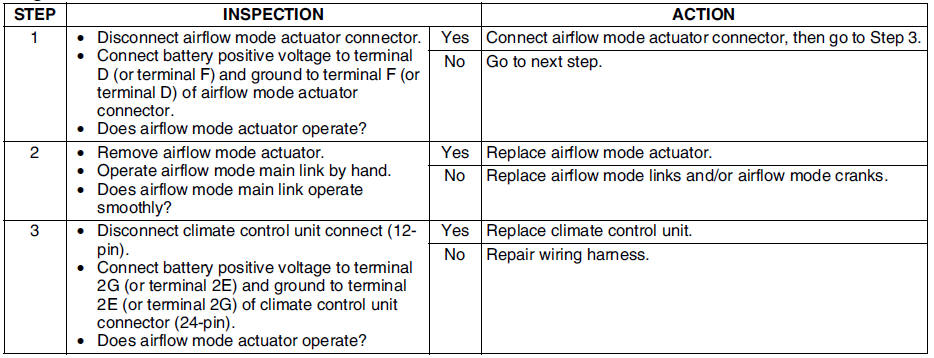
 Dtc 58
Diagnostic Procedure
...
 Dtc 02, 18, 21 (when two or more dtcs are indicated at the same time)
Diagnostic Procedure
...
Other materials:
Mazda 6 Service Manual: Dtc c1095, c1096
Caution
When attaching the tester lead to the DSC HU/CM connector the SST
(49 G066 004) must be used.
Diagnostic procedure
...
Mazda 6 Service Manual: Closing the Hood
1. Check under the hood area to make certain all filler caps are in place and
all loose items (e.g. tools, oil containers, etc.) have been removed.
2. Lift the hood, grasp the padded area on the support rod, and secure the support
rod in the clip. Verify that the support rod is secured in the c ...
© 2016-2026 Copyright www.mazda6info.net