
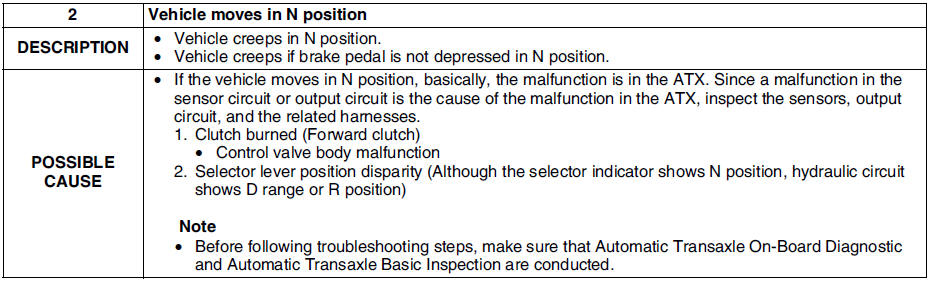
Mazda 6 Service Manual: No.2 vehicle moves in n position
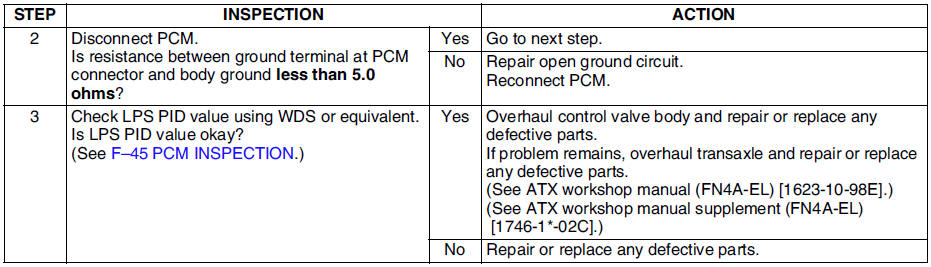
Diagnostic procedure

 No.1 vehicle does not move in d, s, l ranges, or in r position
Diagnostic procedure
...

Other materials:
Mazda 6 Service Manual: Throttle position (tp) sensor inspection
Note
Perform the following inspection only when directed.
Resistance Inspection
1. Perform the following test only when directed.
If as specified but TP PID value is out of specification, inspect
resistance of TP sensor.
If not as specified, inspect the following:
- Accelerato ...
Mazda 6 Service Manual: Instrument cluster repair
Note
The needle of speedometer or tachometer may continue to rotate
clockwise until it indicates over maximum graduation. If a customer
complains of this concern, repair the needle position according to the
following steps.
1. Verify the concern.
2. Turn the ignition switch to LOC ...
© 2016-2026 Copyright www.mazda6info.net