
Mazda 6 Owners Manual: Tire Pressure Monitoring System Initialization
In the following cases, system initialization must be performed so that the system operates normally.
- A tire pressure is adjusted.
- Tire rotation is performed.
- A tire or wheel is replaced.
- The battery is replaced or completely drained.
- The tire pressure monitoring system warning light is illuminated.
Initialization method
1. Park the car in a safe place and firmly apply the parking brake.
2. Let the tires cool, then adjust the tire pressure of all four (4) tires to the specified pressure indicated on the tire pressure label located on the driver's door frame (door open).
Refer to Tires.
3. Switch the ignition ON.
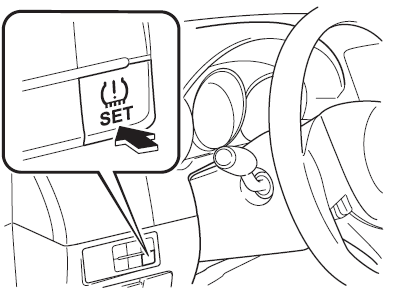
4. Press and hold the tire pressure monitoring system set switch and verify that the tire pressure monitoring system warning light in the instrument cluster flashes twice and a beep sound is heard once.
CAUTION
If the system initialization is performed without adjusting the tire pressure, the system cannot detect the normal tire pressure and it may not illuminate the tire pressure monitoring system warning light even if a tire pressure is low, or it may illuminate the light even if the pressures are normal.
Adjust the tire pressure on all four tires and initialize the system when the warning light is turned on. If the warning light turns on for a reason other than a flat tire, the tire pressure of all four tires may have decreased naturally.
The system initialization will not be performed if the switch is pressed while the vehicle is being driven.
 Tire Pressure Monitoring System
The Tire Pressure Monitoring System (TPMS) monitors the air pressure of all four
tires. If the air pressure of one or more tires is too low, the system warns the
driver by indicating the tire pres ...
 Rear View Monitor
The rear view monitor provides visual images of the rear of the vehicle when
reversing.
WARNING
Always drive carefully confirming the safety of the rear and the surrounding
conditions by looking ...
Other materials:
Mazda 6 Owners Manual: Cigarette lighter removal/installation
1. Disconnect the negative battery cable.
2. Remove in the order indicated in the table.
3. Install in the reverse order of removal.
Socket Removal Note
1. Insert a tape-wrapped screwdriver into the socket hole, then press against
the ring protrusion to lift the socket toward you.
2. As ...
Mazda 6 Owners Manual: Dtc b1318
Caution
When attaching the tester lead to the ABS (ABS/TCS) HU/CM harness
connector, the SST (49 G066 001) must be used. (See ABS (ABS/TCS) HU/CM
INSPECTION.)
Diagnostic procedure
...