
Mazda 6 Owners Manual: Collision Warning
If there is the possibility of a collision with a vehicle ahead, the beep sounds continuously and a warning is indicated in the multi-information display or the active driving display.
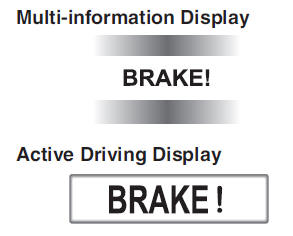
NOTE
The operation distance and volume of the collision warning can be changed.
 Smart City Brake Support (SCBS) Indicator Light (Red) (Type B Instrument Cluster)
If the Smart City Brake Support (SCBS) is operating, the indicator light (red)
flashes.
...
 Automatic Brake Operation Display (Type A Instrument Cluster)
“Smart City Brake Support activated” is indicated in the active driving display,
and “Smart City Brake Support Activated” is indicated in the multi-information display
after the SCBS brake ...
Other materials:
Mazda 6 Owners Manual: Dsc on-board diagnosis
On-Board Diagnostic (OBD) Test Description
(See ABS (ABS/TCS) ON-BOARD DIAGNOSIS)
DTC Table
PID/DATA Monitor Table
Active Command Modes Table
...
Mazda 6 Owners Manual: Abs (abs/tcs) or dsc hu/cm configuration
1. Connect the WDS or equivalent to the DLC-2.
2. Input vehicle information following the direction on the WDS or equivalent
screen.
3. Select Module programming.
4. Select Programmable module installation.
5. Select ABS/TCS.
6. Retrieve DTCs by the WDS or equivalent, then verify that there ...