
Mazda 6 Owners Manual: Shift-Lock Override
If the selector lever will not move from P using the proper shift procedure, continue to hold down the brake pedal.
1. Remove the shift-lock override cover using a cloth-wrapped flat head screwdriver.
2. Insert a screwdriver and push it down.
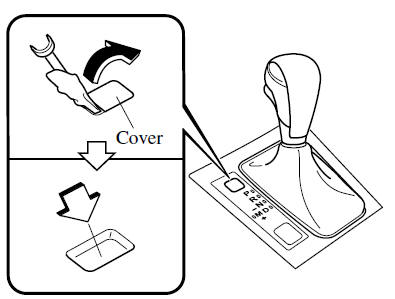
3. Press and hold the lock-release button.
4. Move the selector lever.
Take the vehicle to an Authorized Mazda Dealer to have the system checked.
 Shift-Lock System
The shift-lock system prevents shifting out of P unless the brake pedal is depressed.
To shift from P:
1. Depress and hold the brake pedal.
2. Start the engine.
3. Press and hold the lock-release ...
 Transaxle Ranges
The shift position indicator light in the instrument cluster illuminates.
The selector lever must be in P or N to operate the starter.
P (Park)
P locks the transaxle and prevents the front wh ...
Other materials:
Mazda 6 Owners Manual: Manually Shifting Up
You can shift gears up by operating the selector lever or the steering shift
switches (some models).
M1 → M2 → M3 → M4 → M5 → M6
Using selector lever
To shift up to a higher gear, tap the selector lever back (+) once.
Using steering shift switch (some models)
To ...
Mazda 6 Owners Manual: Interior Equipment (View A)
1 - Door-lock knob 2 - Lighting control 3 - Turn and lane-change signal
4 - Wiper and washer lever 5 - Tire pressure monitoring system set switch 6
- DSC OFF switch 7 - Lane-keep Assist System (LAS) & Lane Departure Warning System
(LDWS) OFF switch 8 - Outside mirror switch 9 - Door-lock ...