
Mazda 6 Service Manual: Abs (abs/tcs) hu/cm removal/installation
Caution
- When replacing the ABS (ABS/TCS) HU/CM, configuration procedure must be done before removing the ABS (ABS/TCS) HU/CM. If configuration is not completed before removing the ABS (ABS/TCS) HU/CM, TCS will not work properly (with TCS model).
- Do not drop the ABS (ABS/TCS) HU/CM. Replace it if it is subjected to an impact.
1. Configurate the ABS (ABS/TCS) HU/CM (when only replacing it). (See ABS (ABS/TCS) or DSC HU/CM CONFIGURATION.)
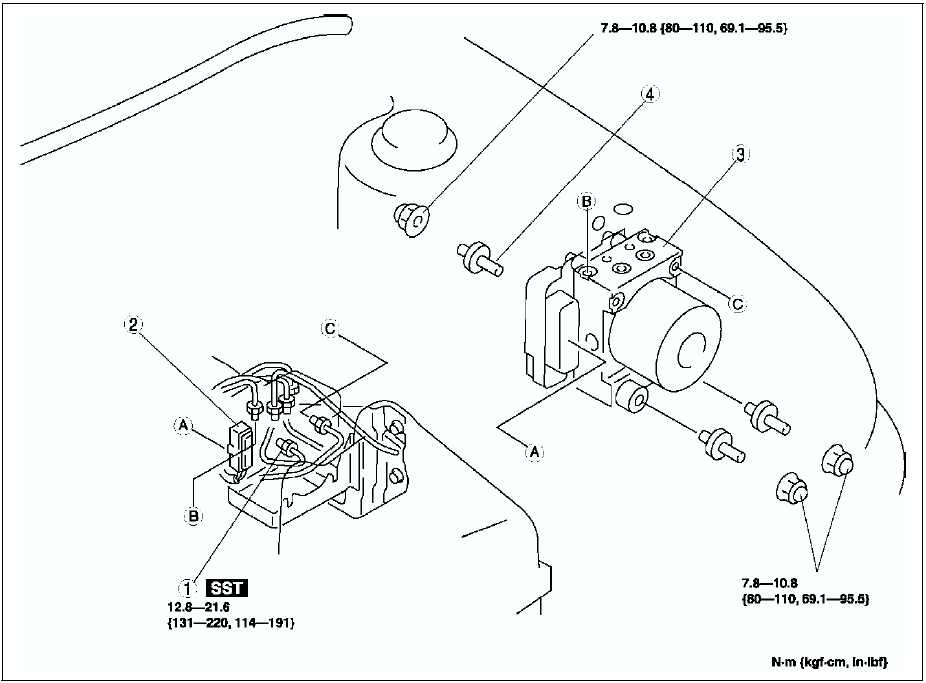
2. Remove the battery, battery tray and battery tray bracket. (See BATTERY REMOVAL/INSTALLATION.)
3. Remove the under cover.
4. Remove in the order indicated in the table.
5. Install in the reverse order of removal.

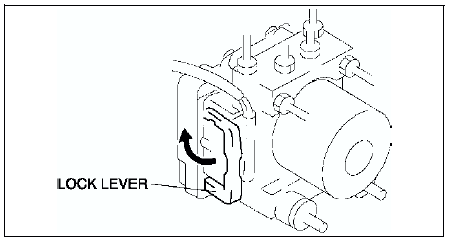
Connector Removal Note
1. Pull the lock lever up and make it unlock.
2. Remove the connector.
ABS HU/CM Removal/Installation Note
When removing/installing the ABS HU/CM from/to the vehicle, attach a strip of protective tape on the ABS HU/CM connector to prevent brake fluid from entering.
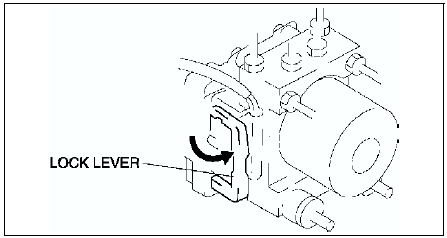
Connector Installation Note
Verify that the lock lever of the harness connector is completely pulled up.
 Abs (abs/tcs) hu/cm system inspection
System Inspection
Preparation
1. Verify that the battery is fully charged. With the ignition switch on,
verify that the ABS and BRAKE system warning lights goes out after 2.4
seconds.
2. If the ...
 Abs (abs/tcs) or dsc hu/cm configuration
1. Connect the WDS or equivalent to the DLC-2.
2. Input vehicle information following the direction on the WDS or equivalent
screen.
3. Select Module programming.
4. Select Programmable module ...
Other materials:
Mazda 6 Service Manual: Cruise Control Switch
Cruise Main Indication (White)/ Cruise Set Indication (Green)
The indication has two colors.
Cruise Main Indication (White)
The indication turns on (white) when the cruise control system is activated.
Cruise Set Indication (Green)
The indication turns on (gr ...
Mazda 6 Service Manual: Foreword
When the customer reports a vehicle malfunction, check the malfunction
indicator lamp (MIL), HOLD indicator light flashing, and PCM memory for
diagnostic trouble code (DTC), then diagnose the malfunction according to
following flowchart.
- If the DTC exists, diagnose the applicable ...