
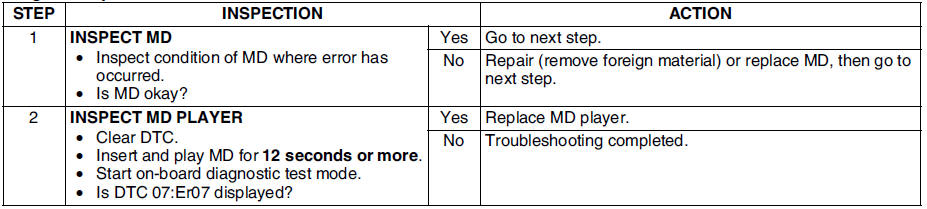
Mazda 6 Service Manual: Dtc 07:er07

Diagnostic procedure
 Dtc 07:er02
Diagnostic procedure
...
 Diagnostic assist function
Structural View
Switch location
LCD Inspection
1. With audio on, first press the POWER button, then simultaneously press the
SEEK button (upper) for approximately 1 second.
2. Inspect the LC ...
Other materials:
Mazda 6 Service Manual: Mounting the Spare Tire
1. Remove dirt and grime from the mounting surfaces of the wheel and hub, including
the hub bolts, with a cloth.
WARNING
Make sure the mounting surfaces of the wheel, hub and lug nuts are clean
before changing or replacing tires: When changing or replacing a tire, not
removing dirt and gri ...
Mazda 6 Service Manual: Cargo compartment light switch inspection
1. Remove the liftgate lower trim. (See LIFTGATE LOWER TRIM
REMOVAL/INSTALLATION)
2. Disconnect the cargo compartment light switch connector.
3. Inspect for continuity between the cargo compartment light switch
terminals using an ohmmeter.
If not as specified, replace the liftgate lock.
...
© 2016-2026 Copyright www.mazda6info.net