
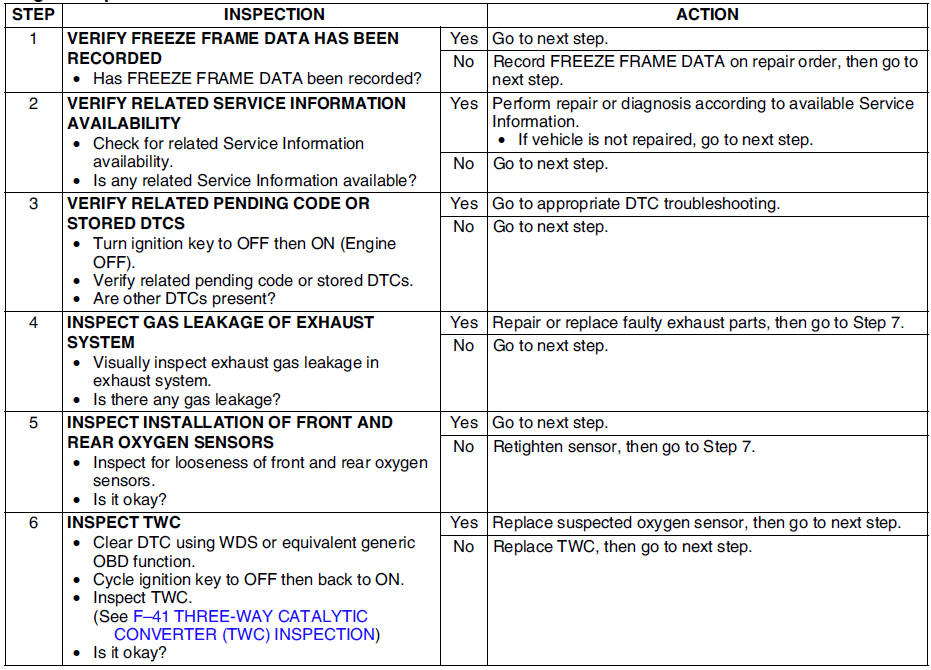
Mazda 6 Service Manual: Dtc p0420

Diagnostic procedure

 Dtc p0403
Diagnostic procedure
...
 Dtc p0443
Diagnostic procedure
...
Other materials:
Mazda 6 Service Manual: Maintenance Monitor
1. Select the icon on the home
screen to display the “Applications” screen.
2. Select “Vehicle Status Monitor” to display the current warnings.
3. Select “Maintenance” to display the maintenance list screen.
4. Switch the tab and select the setting item you want to change.
You can ...
Mazda 6 Service Manual: No.2 neither abs warning light nor brake system warning lightilluminate with
ignition switch on
When performing an asterisked (*) troubleshooting inspection, shake the
wiring harness and connectors while doing the inspection to discover whether
poor contact points are the cause of any intermittent malfunction. If there
is a problem, check to make sure connectors, terminals and ...