
Mazda 6 Service Manual: Dtc table
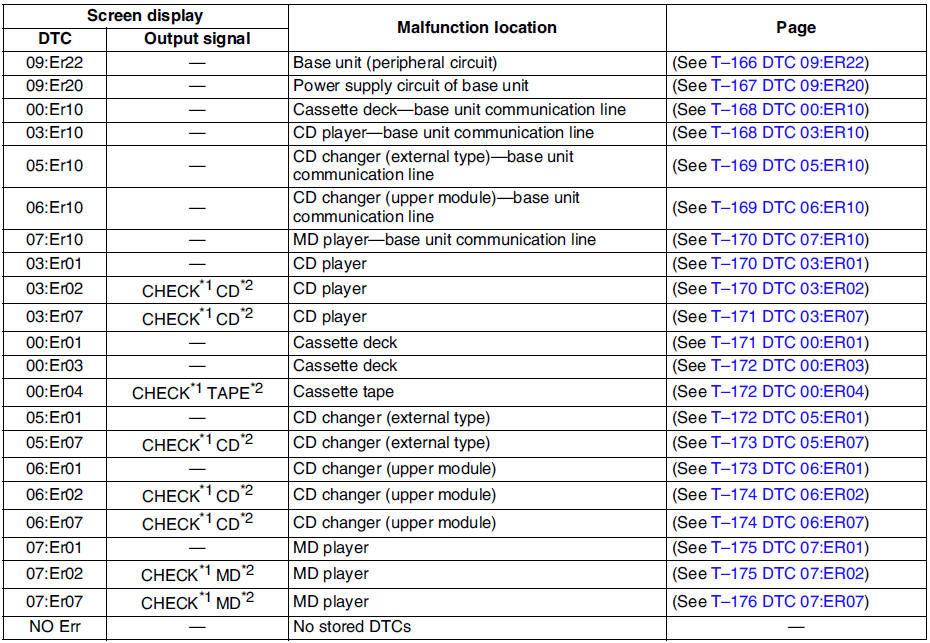
*1,*2 : When an error occurs, the error messages are displayed three times in the order of *1 and *2, respectively.
 Dtc clearing procedure
1. Start the on-board diagnostic test mode.
2. First press the POWER button, then simultaneously press AUDIO CONT button
for 2 seconds or more.
Caution
Before clearing the DTCs, be sure to ...
 Dtc 09:er22
Diagnostic procedure
...
Other materials:
Mazda 6 Service Manual: Driver Air Bag
The driver's air bag is mounted in the steering wheel.
When air bag crash sensors detect a frontal impact of greater than moderate force,
the driver's air bag inflates quickly helping to reduce injury mainly to the driver's
head or chest caused by directly hitting the steering wheel. For more d ...
Mazda 6 Service Manual: Dehumidifying (With air conditioner)
Operate the air conditioner in cool or cold weather to help defog the windshield
and side windows.
1. Set the mode selector dial to the desired position.
2. Set the air intake selector to the outside air position (indicator light turns
off).
3. Set the temperature control dial to the desired ...