
Mazda 6 Owners Manual: i-ELOOP
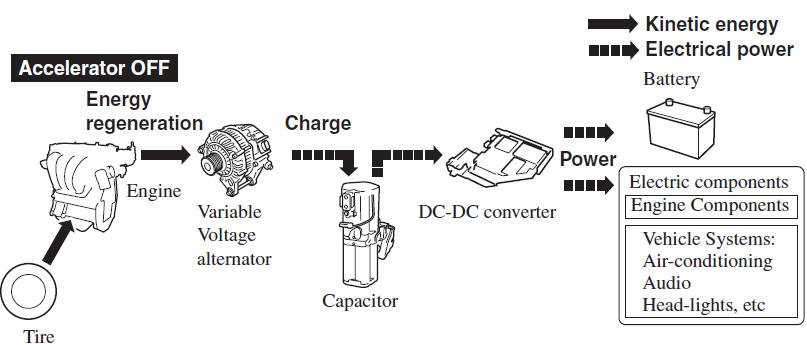
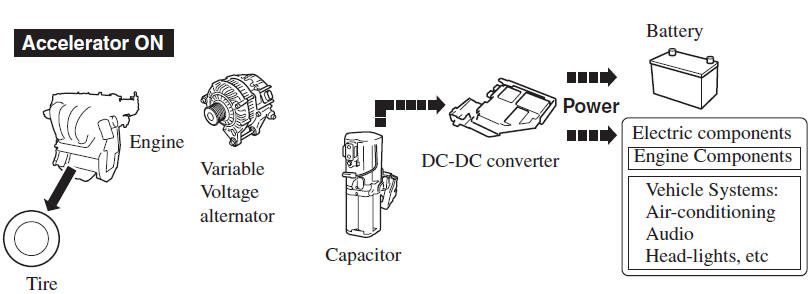
i-ELOOP is a regenerative braking system. When you depress the brake pedal or use engine braking, the kinetic energy that occurs is converted to electrical energy by the power generator and the converted electrical energy is stored in the rechargeable battery (capacitor and battery). The stored electricity is used as power to charge the battery and the vehicle's electrical devices.
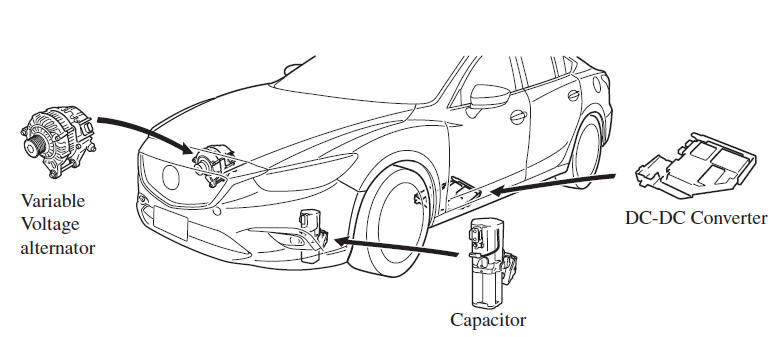
- A variable voltage alternator is incorporated in the power generator which converts the kinetic energy to electricity and can generate electricity efficiently according to the vehicle conditions.
- A capacitor is used to store large amounts of electricity instantly which can be utilized quickly.
- A DC-DC converter is incorporated which steps down the stored electricity to voltage useable by the vehicle's electrical devices.
CAUTION
High-current electricity flows through the following parts, therefore do not touch them.
- Variable voltage alternator
- DC-DC converter
- Capacitor
NOTE
- A difference in the fuel economy may occur depending on how the vehicle's electrical devices are used.
- If the capacitor is to be disposed of, always consult an Authorized Mazda
Dealer.
For details, go to the following URL.
http://www.mazda.com/csr/environment/recycling
i-ELOOP Control Status Display
The driver is notified of the i-ELOOP power generating status and the vehicle conditions by the control status display.
The i-ELOOP power generating status is displayed in the center display.
Refer to Control Status Display.
i-ELOOP Charging Display
If the engine is started after the vehicle has not been driven for a long period of time, an “i-ELOOP Charging Please don't Drive” message may be indicated in the display.
Leave the engine idling and wait until the message disappears.
NOTE
If the vehicle is driven while the message is displayed, a beep sound is heard. If you turn the steering wheel while the message is displayed, it will feel heavier than normal, but this does not indicate an abnormality. Stop the vehicle in a safe location with the engine running and do not attempt to turn the steering wheel. The steering operation will return to normal after the message is no longer displayed.

 DSC OFF Switch
Press the DSC OFF switch to turn off the TCS/DSC. The DSC OFF indicator light
in the instrument cluster will illuminate.
Press the switch again to turn the TCS/ DSC back on. The DSC OFF indicator ...
 Fuel Economy Monitor
The Control Status and Fuel Consumption are switched and displayed by operating
each icon in the display.
In addition, after completing a trip, the total energy efficiency to date is
displayed in ...
Other materials:
Mazda 6 Owners Manual: Dsc on-board diagnosis
On-Board Diagnostic (OBD) Test Description
(See ABS (ABS/TCS) ON-BOARD DIAGNOSIS)
DTC Table
PID/DATA Monitor Table
Active Command Modes Table
...
Mazda 6 Owners Manual: Control valve body removal
On-Vehicle Removal
Warning
Using compressed air can cause dirt and other particles to fly
out, causing injury to the eyes. Wear protective eyes whenever using
compressed air.
Caution
Clean the transaxle exterior throughout with a steam cleaner or
cleaning solvents before removal ...