
Mazda 6 Owners Manual: Indicators
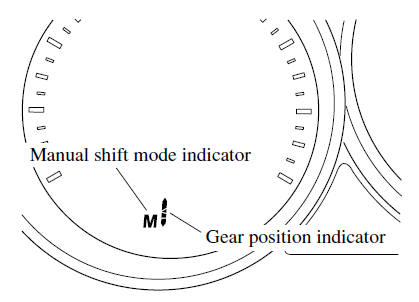
Manual shift mode indication
In manual shift mode, the “M” of the shift position indication in the instrument panel illuminates.
Gear position indication
The numeral for the selected gear illuminates.
NOTE
- If the gears cannot be shifted down when driving at higher speeds, the gear position indication will flash twice to signal that the gears cannot be shifted down (to protect the transaxle).
- If the automatic transaxle fluid (ATF) temperature becomes too high, there is the possibility that the transaxle will switch to automatic shift mode, canceling manual shift mode and turning off the gear position indication illumination. This is a normal function to protect the AT. After the ATF temperature has decreased, the gear position indication illumination turns back on and driving in manual shift mode is restored.
 Manual Shift Mode
The manual shift mode gives you the feel of driving a manual transaxle vehicle
by allowing you to operate the selector lever manually. This allows you to control
engine rpm and torque to the drive ...
 Manually Shifting Up
You can shift gears up by operating the selector lever or the steering shift
switches (some models).
M1 → M2 → M3 → M4 → M5 → M6
Using selector lever
To shift up to ...
Other materials:
Mazda 6 Owners Manual: Transmitter battery inspection
Caution
Since the battery voltage does not drop fully if the button is
pushed for only 4 seconds or less, it can not be properly examined to see
whether it is good or bad. Always push the button for 5 seconds.
Note
A correct measurement can not be obtained if the battery
temperat ...
Mazda 6 Owners Manual: Jacking positions ,vehicle lift (2 supports),safety stands (rigid rack)
positions
Jacking Positions
Warning
Improperly jacking a vehicle is dangerous. The vehicle can slip
off the jack and cause serious injury. Use only the correct front and rear
jacking points and block the wheels.
Use safety stands to support the vehicle after it has been lifted.
Fro ...