
Mazda 6 Owners Manual: Manually Shifting Up
You can shift gears up by operating the selector lever or the steering shift switches (some models).
M1 → M2 → M3 → M4 → M5 → M6
Using selector lever
To shift up to a higher gear, tap the selector lever back (+)
once.
Using steering shift switch (some models)
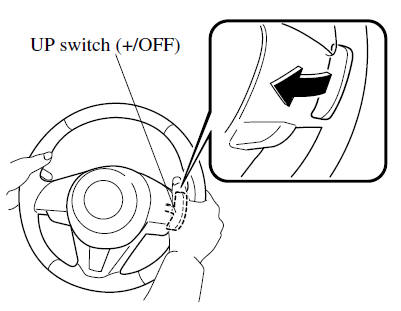
To shift up to a higher gear with the steering shift switches, pull the UP switch (+/OFF
) toward you once with your fingers.
WARNING
Keep your hands on the steering wheel rim when using fingers on the steering shift switches:
Putting your hands inside the rim of the steering wheel when using the steering shift switches is dangerous. If the driver's air bag were to deploy in a collision, your hands could be impacted causing injury.
NOTE
- When driving slowly, the gears may not shift up.
- Do not drive the vehicle with the tachometer needle in the RED ZONE while
in manual shift mode. In addition, manual shift mode switches to automatic shift
mode while the accelerator pedal is completely depressed.
This function is canceled while the DSC is turned off. However, if the vehicle is continuously driven at a high rpm, the gears may automatically shift up to protect the engine.
- The steering shift switch can be used temporarily even if the selector
lever is in the D position while driving. In addition, it returns to automatic
shift mode when the UP switch (+/OFF
) is pulled rearward for a sufficient amount of time.
 Indicators
Manual shift mode indication
In manual shift mode, the “M” of the shift position indication in the instrument
panel illuminates.
Gear position indication
The numeral for the selected gear ill ...
 Manually Shifting Down
You can shift gears down by operating the selector lever or the steering shift
switches (some models).
M6 → M5 → M4 → M3 → M2→ M1
Using selector lever
To shift down ...
Other materials:
Mazda 6 Owners Manual: Steering shaft inspection
1. Inspect the following.
(1) Column bearing for damage
(2) Steering shaft length
Replace the steering shaft component as necessary.
Length
211.6 mm {8.3 in}
2. Inspect the tilt and telescope operation
(1) Verify that the adjusting lever moves smoothly from unlock posit ...
Mazda 6 Owners Manual: Operation of Automatic Air-conditioning
1. Press the AUTO switch. Selection of the airflow mode, air intake selector
and amount of airflow will be automatically controlled.
2. Use the temperature control dial to select a desired temperature. Press the
DUAL switch or turn the front passenger temperature control dial to control the
s ...