
Mazda 6 Service Manual: Joint shaft removal/installation
Caution
- Performing the following procedures without first removing the ABS wheel-speed sensor may possibly cause an open circuit in the harness if it is pulled by mistake. Before performing the following procedures, remove the ABS wheel-speed sensor and fix it to an appropriate place where the sensor will not be pulled by mistake while the vehicle is being serviced.
1. Drain the transaxle oil. (See AUTOMATIC TRANSAXLE FLUID (ATF) REPLACEMENT.) (See TRANSAXLE OIL REPLACEMENT.)
2. Remove the ABS sensor. (See FRONT ABS WHEEL-SPEED SENSOR REMOVAL/INSTALLATION.)
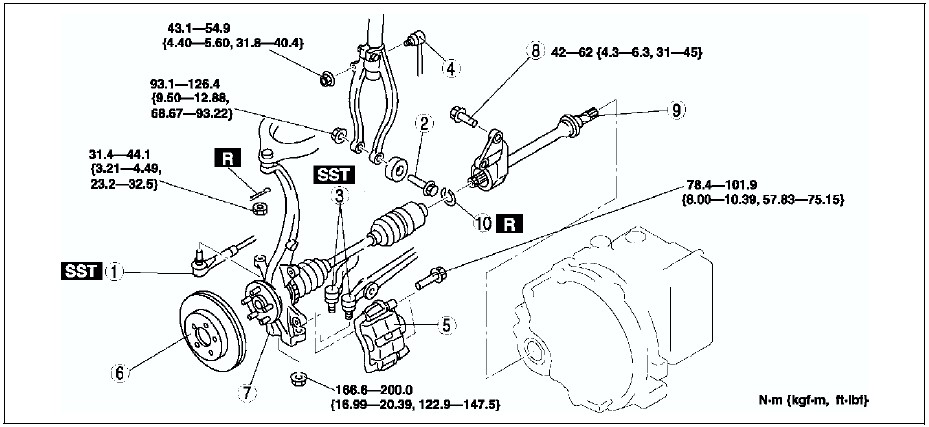
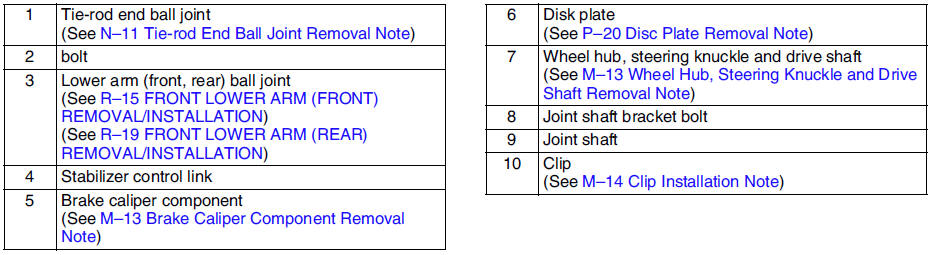
3. Remove in the order indicated in the table.
4. Install in the reverse order of removal.
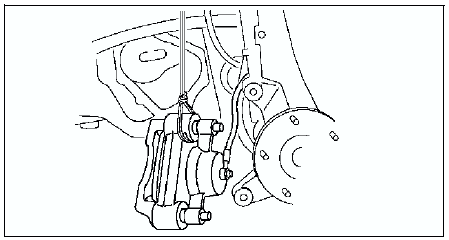
Brake Caliper Component Removal Note
Suspend the caliper aside with wire.
Wheel Hub, Steering Knuckle and Drive Shaft Removal Note
Caution
- The sharp edges of the joint shaft can slice or puncture the oil seal. Be careful when removing the joint shaft from the transaxle.
1. Pull the joint shaft straight out.
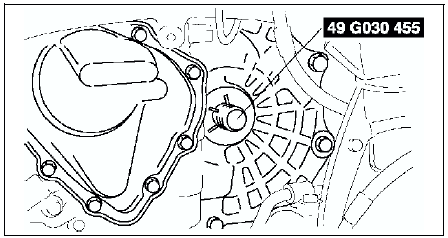
2. Install the SST
into the transaxle to hold the side gears after the joint shaft is removed.
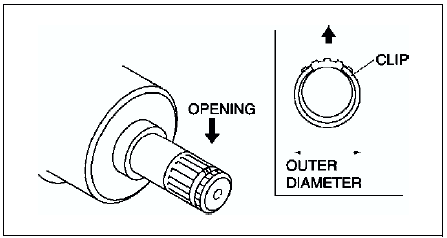
Clip Installation Note
1. Install a new clip onto the joint shaft with the opening facing upward. Ensure that the diameter of the clip does not exceed the specification on installation.
2. After installation, measure the outer diameter. If it exceeds the specification, repeat Step 1 using a new clip.
Outer diameter specification 31.2 mm {1.23 in} max.
 Joint shaft pre-inspection
1. Verify that the joint shaft is not twisted or cracked.
Replace it as necessary.
2. Turn the joint shaft by hand and verify that the bearing rotates smoothly
and freely.
Replace it as n ...
 Joint shaft disassembly/assembly
1. Disassemble in the order indicated in the table.
2. Assemble in the reverse order of disassembly.
Joint Shaft Disassembly Note
Disassemble the joint shaft.
Bearing Disassembly Note
Remov ...
Other materials:
Mazda 6 Service Manual: Radio Reception
AM characteristics
AM signals bend around such things as buildings or mountains and bounce off the
ionosphere.
Therefore, they can reach longer distances than FM signals.
Because of this, two stations may sometimes be picked up on the same frequency
at the same time.
FM characteristics
An ...
Mazda 6 Service Manual: Scheduled Maintenance (Mexico)
Follow Schedule 1 if the vehicle is operated mainly where none of the following
conditions apply.
Repeated short-distance driving
Driving in dusty conditions
Driving with extended use of brakes
Driving in areas where salt or other corrosive materials are used
Driving on rough or muddy ...