
Mazda 6 Owners Manual: KEY Warning Light (Some models)
Take the appropriate action and verify that the warning light turns off.
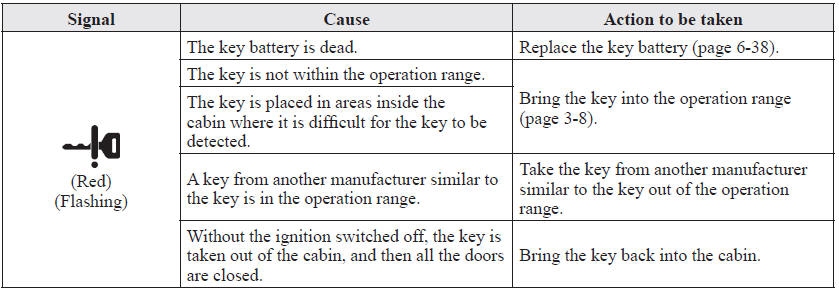
 Taking Action
Take the appropriate action and verify that the warning light turns off.
...
 Message Indicated on Display
If a message is displayed in the center display, take appropriate action (in
a calm manner) according to the displayed message.
...
Other materials:
Mazda 6 Owners Manual: Inspecting Coolant Level
WARNING
Do not use a match or live flame in the engine compartment. DO NOT ADD
COOLANT WHEN THE ENGINE IS HOT: A hot engine is dangerous. If the engine has
been running, parts of the engine compartment can become very hot. You could be
burned. Carefully inspect the engine coolant in the coola ...
Mazda 6 Owners Manual: i-ELOOP
i-ELOOP is a regenerative braking system. When you depress the brake pedal or
use engine braking, the kinetic energy that occurs is converted to electrical energy
by the power generator and the converted electrical energy is stored in the rechargeable
battery (capacitor and battery). The store ...