
Mazda 6 Service Manual: No.2 mil illuminates

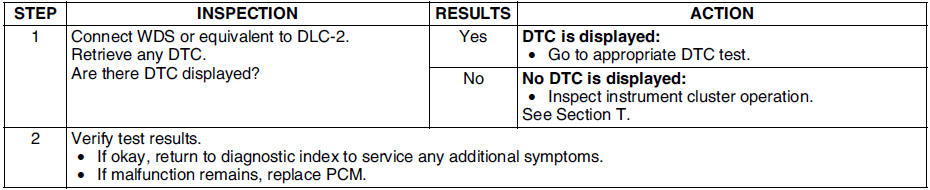
Diagnostic procedure

 No.3 will not crank
Diagnostic procedure
...
Other materials:
Mazda 6 Service Manual: Anti-theft system
Alarm Conditions
If the anti-theft system protection has been activated, any one of the
following conditions will trigger the system:
- Disconnected battery cable
- Discharged battery
- Disconnected audio unit connectors
If the system is triggered, the audio unit will then be ...
Mazda 6 Service Manual: Engine Coolant Temperature Gauge
Displays the engine coolant temperature. The blue gauge indicates that the engine
coolant temperature is low, and the red gauge indicates that the engine coolant
temperature is high and overheating.
CAUTION
If the high engine coolant temperature warning light (red) turns on, there
is a pos ...
© 2016-2026 Copyright www.mazda6info.net