
Mazda 6 Service Manual: Rear map light removal/installation
1. Disconnect the negative battery cable.
2. Remove in the order indicated in the table.
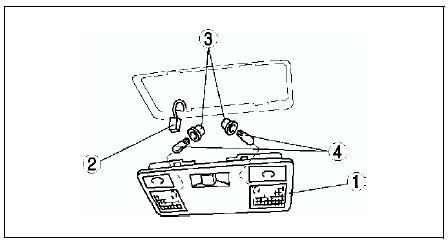

3. Install in the reverse order of removal.
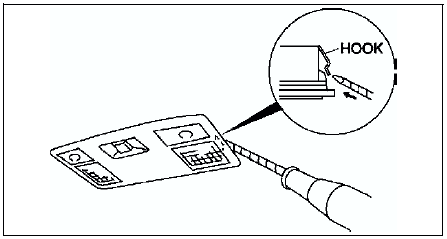
Rear Map Light Removal Note
1. Insert a tape-wrapped flathead screwdriver into the gap between the headliner and the rear map light.
2. Push the hooks to remove the rear map light.
 Front map light inspection
1. Remove the front map light. (See FRONT MAP LIGHT REMOVAL/INSTALLATION.)
2. Inspect for continuity between the front map light terminals using an
ohmmeter.
If not as specified, replace the fr ...
 Rear map light inspection
1. Remove the rear map light. (See REAR MAP LIGHT REMOVAL/INSTALLATION.)
2. Inspect for continuity between the rear map light terminals using an
ohmmeter.
If not as specified, replace the rear ...
Other materials:
Mazda 6 Service Manual: Traffic Sign Recognition System (TSR) (Some models)
The Traffic Sign Recognition System (TSR) helps prevent the driver from overlooking
traffic signs, and provides support for safer driving by displaying traffic signs
on the active driving display which are recognized by the Forward Sensing Camera
(FSC) or recorded in the navigation system whil ...
Mazda 6 Service Manual: Receiving an Incoming Call
When an incoming call is received, the incoming call notification screen is displayed.
The “Incoming Call Notifications” setting must be on.
To accept the call, press the pick-up button on the audio control switch or select
on the screen.
To reject the call, press the hang-up button on the ...