
Mazda 6 Service Manual: Rear scuff plate removal/installation
1. Pull the rear scuff plate upward, then disengage clips A, pin B, and hooks C from the body, and remove the rear scuff plate.
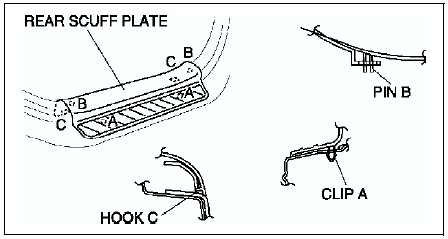
2. Install in the reverse order of removal.
 Front scuff plate removal/installation
1. Pull the front scuff plate upward, then disengage clips B, pins C, D and
hooks E from the body, and remove the front scuff plate.
2. Install in the reverse order of removal. ...
 C-pillar trim removal/installation
4SD
1. Remove the tire house trim.
2. Turn the seaming welt over.
3. Remove the cap using a fastener remover, and remove the bolt (with curtain
air bag system).
4. Disengage clips A and clip B ...
Other materials:
Mazda 6 Service Manual: Rear door trim removal/installation
1. Disconnect the negative battery cable if equipped with power window
system.
2. Remove the regulator handle if equipped.
3. Open the cap using a small screwdriver, then remove the screw.
4. Remove the inner handle cover.
5. Remove the cover, then remove screw.
6. Disengage clips A from th ...
Mazda 6 Service Manual: Ignition coil inspection
Primary Coil Winding
1. Remove the ignition coil.
2. Measure the resistance between the following lead holes using an ohmmeter.
A and B, B and C
- If not specified, replace the ignition coil.
Specification
0.49-0.57 ohms [20°C {68°F}]
Secondary Coil Winding
1. Remove the igni ...