
Mazda 6 Service Manual: Symbols
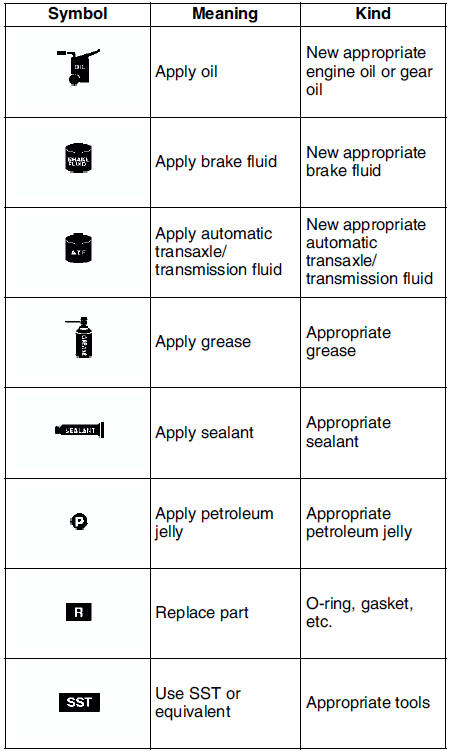
- There are eight symbols indicating oil, grease, fluids, sealant, and SST or equivalent use. These symbols show application points or use of these materials during service.
 Service procedure
Inspection, adjustment
Inspection and adjustment procedures are divided into steps. Important
points regarding the location and contents of the procedures are explained
in detail and shown i ...
 Advisory messages
You'll find several Warnings, Cautions, Notes, Specifications and Upper
and Lower Limits in this manual.
Warning
A Warning indicates a situation in which serious injury or death
could ...
Other materials:
Mazda 6 Service Manual: Front door speaker removal/installation
1. Disconnect the negative battery cable.
2. Remove the front door trim.
3. Remove in the order indicated in the table.
4. Install in the reverse order of removal.
Front Door Speaker Installation Note
Attach the speaker with the wiring harness placed in the groove of the door
unit panel.
...
Mazda 6 Service Manual: Removing a Flat Tire
1. Loosen the lug nuts by turning them counterclockwise one turn each, but do
not remove any lug nuts until the tire has been raised off the ground.
2. Place the jack on the ground.
3. Turn the jack screw in the direction shown in the figure and adjust the jack
head so that it is close to th ...
© 2016-2026 Copyright www.mazda6info.net