
Mazda 6 Owners Manual: Turn Signals
Move the signal lever down (for a left turn) or up (for a right turn) to the stop position. The signal will self-cancel after the turn is completed.
If the indicator light continues to flash after a turn, manually return the lever to its original position.
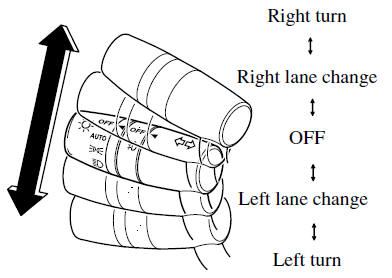
The turn signal indicators in the instrument cluster flash according to the operation of the turn signal lever to show which signal is working.

NOTE
- If an indicator light stays on without flashing or if it flashes abnormally, one of the turn signal bulbs may be burned out.
- A personalized function is available to change the turn indicator sound volume.
 Turn and Lane-Change Signals
The ignition must be switched ON to use the turn and lane-change signals. ...
 Lane-Change Signals and Three-Flash Turn Signal
Lane-Change Signals
Move the lever halfway toward the direction of the lane change—until the indicator
flashes— and hold it there. It will return to the off position when released.
Three-Flash ...
Other materials:
Mazda 6 Owners Manual: Climate control unit inspection
Full-auto Air Conditioner
1. Connect the all center panel connectors.
2. Turn the ignition switch to ON position.
3. Measure the voltage at each climate control unit terminal and refer to the
terminal voltage list.
If not as specified, inspect the parts listed under Action and the
relate ...
Mazda 6 Owners Manual: Transmitter
NOTE
(With theft-deterrent system) The hazard warning lights flash
when the theft-deterrent system is armed or turned off. Refer to Theft-Deterrent
System.
(With the advanced keyless function) A beep sound can be heard
for confirmation when the doors are locked/ unlocked using the k ...