
Mazda 6 Service Manual: Abbreviations
Mazda 6 Service Manual / General information / Abbreviations
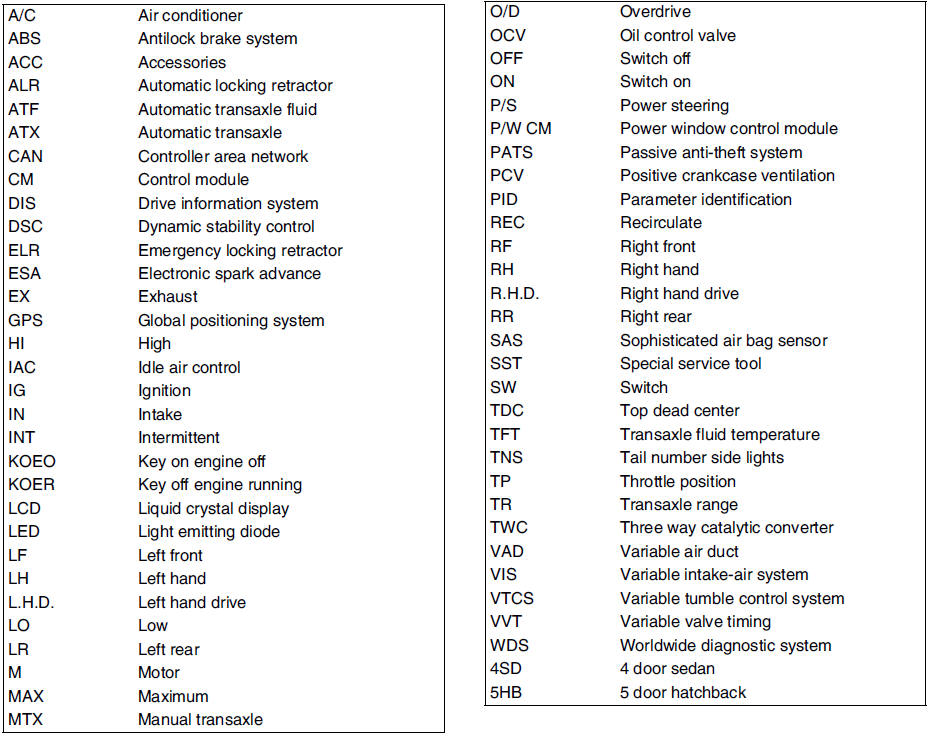
 New standards
Following is a comparison of the previous standard and the new standard.
#1 : Diagnostic trouble codes depend on the diagnostic test mode
#2 : Controlled by the PCM
#3 : In some models, th ...
 Pre-delivery inspection
PRE-DELIVERY INSPECTION TABLE EXTERIOR
INSPECT and ADJUST, if necessary, the following items to
specification:
- Glass, exterior bright metal and paint for damage
- All weatherstrips for da ...
Other materials:
Mazda 6 Service Manual: Supplemental Restraint System Components
(With Front Passenger Occupant Classification System)
(Without Front Passenger Occupant Classification System)
Driver/Front passenger inflators and air bags
Roll-over sensor (some models), crash sensors, and diagnostic module (SAS
unit).
Seat belt pretensioners
Front air bag sensor ...
Mazda 6 Service Manual: Nonreturn valve inspection
1. Remove the fuel pump unit. (See FUEL PUMP UNIT REMOVAL/INSTALLATION.)
2. Siphon the fuel from the fuel tank.
Note
Nonreturn valve is integrated in the fuel tank.
The nonreturn valve is normally closed by the spring force.
3. Verify that the nonreturn valve is closed.
If the nonretu ...
© 2016-2026 Copyright www.mazda6info.net