
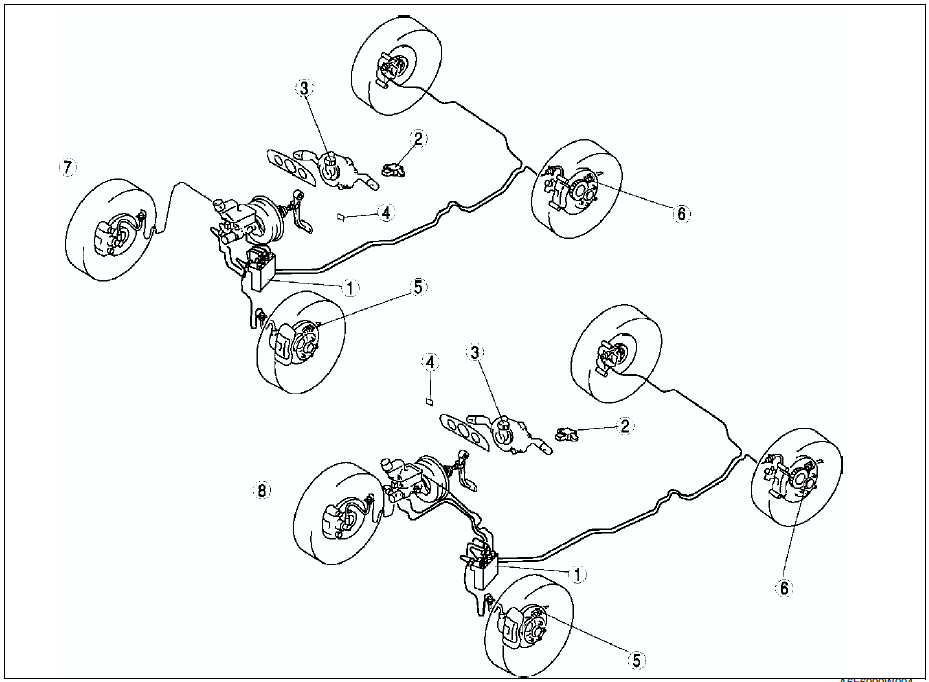
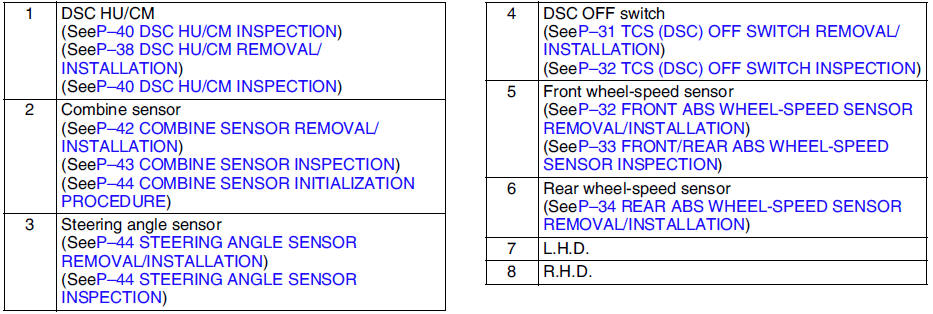
Mazda 6 Service Manual: Dsc location index

 General procedures
PRECAUTION (BRAKES)
Wheels and Tires Removal/Installation
1. The removal and installation procedures for the wheels and tires are not
mentioned in this section. When a
wheel is removed, tighten i ...
Other materials:
Mazda 6 Service Manual: Airflow mode actuator inspection
1. Connect battery positive voltage to terminal D or F and ground to terminal
F or D of the airflow mode actuator.
2. Verify that the airflow mode actuator operates as shown below.
If not as specified, replace the airflow mode actuator.
3. Verify that the resistance between the ter ...
Mazda 6 Service Manual: Rear bumper removal/installation
1. Disconnect the negative battery cable.
2. Remove the rear combination light.
3. Remove in the order indicated in the table.
4. Install in the reverse order of removal.
Rear Bumper Removal Note
Pull the rear bumper ends (wheel arch) outward to disengage with the bumper
slider.
Cautio ...
© 2016-2026 Copyright www.mazda6info.net