
Mazda 6 Service Manual: Engine symptom troubleshooting
- Confirm trouble symptom using the following diagnostic index, then go to appropriate troubleshooting chart.
Diagnostic Index
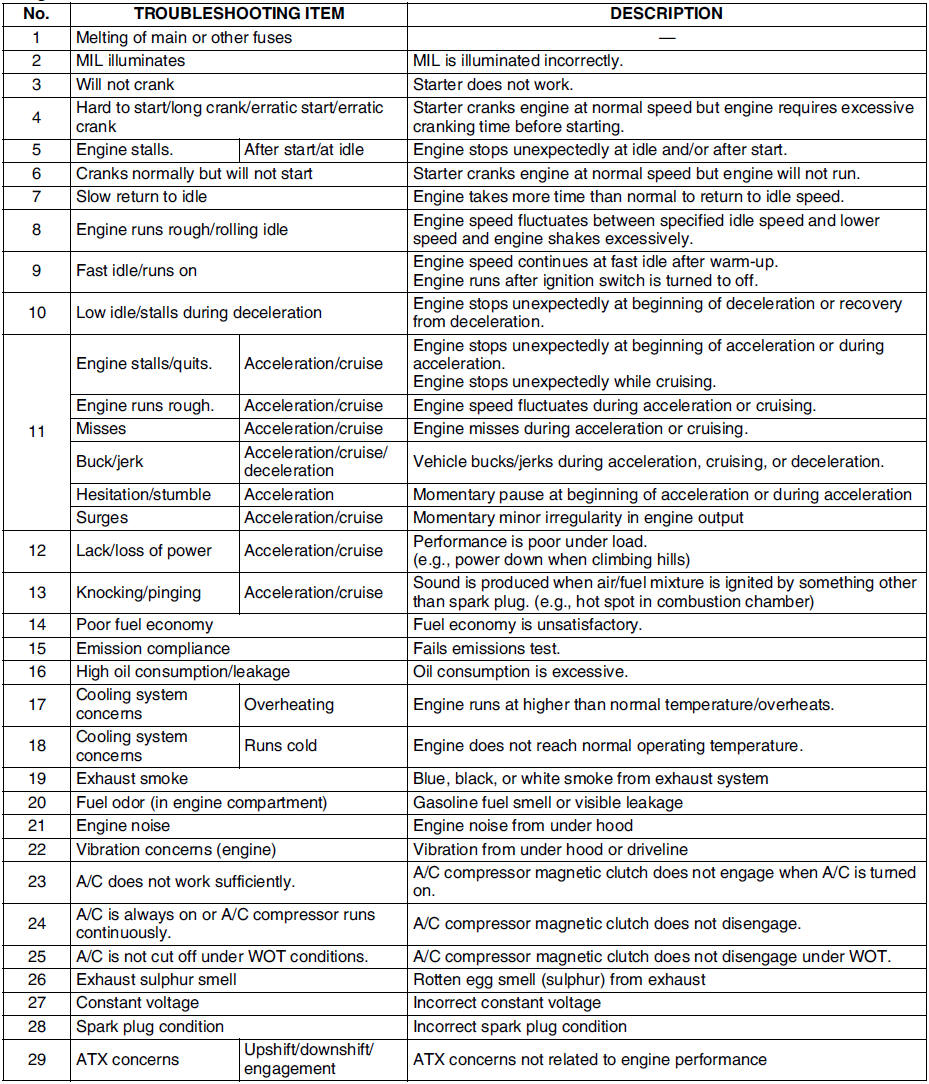
 Troubleshooting
...

Other materials:
Mazda 6 Service Manual: How to connect USB port/Auxiliary jack
Connecting a device
1. Open the console lid.
2. Connect the connector on the device to the USB port.
Connecting with a connector cable
1. Open the console lid.
2. Connect the device plug/connector cable to the auxiliary jack/USB port. Pass
the device plug/connector cable through the notch i ...
Mazda 6 Service Manual: Operating the Compact Disc (CD) Player
NOTE
If a disc has both music data (CD-DA) and MP3/WMA/AAC files, playback of the
two or three file types differs depending on how the disc was recorded.
Inserting the CD
Insert the CD into the slot, label-side up. The auto-loading mechanism will set
the CD and begin play.
NOTE
There wi ...