
Mazda 6 Service Manual: Flasher unit removal/installation
1. Disconnect the negative battery cable.
2. Remove the instrument cluster. (See INSTRUMENT CLUSTER REMOVAL/INSTALLATION)
3. Remove in the order indicated in the table.
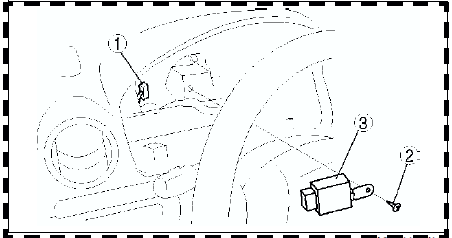

4. Install in the reverse order of removal.
 Back-up light switch inspection
1. Disconnect the back-up light switch connector.
2. Inspect for continuity between the back-up light switch terminals using an ohmmeter.
If not as specified, replace the back-up light switch ...
 Flasher unit inspection
1. Connect the connector to the flasher unit.
2. Connect the negative battery cable.
3. Measure the voltage at the flasher unit using voltmeter.
When inspecting terminal F for continuity, dis ...
Other materials:
Mazda 6 Service Manual: Refrigerant pressure switch removal/installation
1. Remove the battery.
2. Discharge the refrigerant from the system. (See RECOVERY.) (See CHARGING.)
3. Loosen the refrigerant pressure switch using two spanners.
4. Remove in the order indicated in the table.
5. Install in the reverse order of removal.
Refrigerant Pressure Switch Installat ...
Mazda 6 Service Manual: Front outer handle removal/installation
1. Remove the front door glass.
2. Detach the outer handle and front door latch rod.
3. For protector-equipped vehicles, refer to key cylinder
removal/installation to remove the protector.
4. Remove the bolts.
5. With the rear side of the outer handle fixed and the outer handle lever
pulle ...