
Mazda 6 Service Manual: License plate light removal/installation
1. Disconnect the negative battery cable.
2. Remove the rear finisher. (See REAR FINISHER REMOVAL/INSTALLATION)
3. Remove in the order indicated in the table.
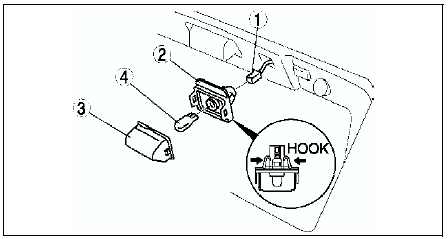
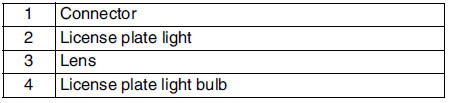
4. Install in the reverse order of removal.
 High-mount brake light removal/installation
4SD
In-vehicle-type
1. Disconnect the negative battery cable.
2. Remove in the order indicated in the table.
3. Install in the reverse order of removal.
Rear spoiler type
1. Disconnect the n ...
 Combination switch removal/installation
1. Disconnect the negative battery cable.
2. Remove the driver-side air bag module. (See DRIVER-SIDE AIR BAG MODULE
REMOVAL/INSTALLATION.)
3. Remove the steering wheel. (See STEERING WHEEL AND COL ...
Other materials:
Mazda 6 Service Manual: Dtc c1148, c1158, c1168, c1178, c1233, c1234, c1235, c1236
Caution
When attaching the tester lead to the ABS (ABS/TCS) HU/CM harness
connector, the SST (49 G066 001) must be used. (See ABS (ABS/TCS) HU/CM
INSPECTION.)
Diagnostic procedure
...
Mazda 6 Service Manual: Seat Operation
1. Seat Slide
(Manual Seat)
To move a seat forward or backward, raise the lever and slide the seat to the
desired position and release the lever.
Make sure the lever returns to its original position and the seat is locked in
place by attempting to push it forward and backward.
(Power Seat) ...